What Is a Smart Light Bulb
Smart light bulbs are Wi-Fi-enabled bulbs that let you control lighting from anywhere using your phone, voice assistants, or automation routines. Unlike traditional bulbs, they offer features like dimming, color changing, scheduling, and energy monitoring, making them a game-changer for convenience, ambiance, and smart home integration.
Key Takeaways
- Smart light bulbs connect to Wi-Fi or Bluetooth: Unlike traditional bulbs, they link to your home network, allowing control via smartphones, voice assistants, or smart speakers.
- They offer customizable lighting: Change brightness, color, and temperature to match your mood, time of day, or activity.
- Automation and scheduling are key: Set routines like turning lights on at sunset or waking up with a gentle sunrise simulation.
- Energy efficiency and cost savings: Many smart bulbs use less energy than incandescent bulbs and include features like motion detection to reduce waste.
- Integration with smart ecosystems: Works with Google Home, Amazon Alexa, Apple HomeKit, and platforms like IFTTT and SmartThings.
- Voice control is seamless: Use commands like “Alexa, turn on the living room lights” or “Hey Google, dim the bedroom lights.”
- Remote access adds convenience: Control lights from anywhere—great for security, checking on kids, or turning off forgotten lights.
📑 Table of Contents
- What Is a Smart Light Bulb?
- How Do Smart Light Bulbs Work?
- Types of Smart Light Bulbs
- Benefits of Using Smart Light Bulbs
- Popular Smart Light Bulb Brands and Models
- How to Choose the Right Smart Light Bulb
- Setting Up Your Smart Light Bulbs
- Smart Light Bulbs and Energy Savings
- Common Misconceptions About Smart Light Bulbs
- Future of Smart Light Bulbs
What Is a Smart Light Bulb?
Imagine walking into your home and saying, “Alexa, it’s time to relax,” and your living room lights instantly dim to a soft, warm glow. Or picture this: you’re on vacation, but you want to make it look like someone’s home—so you use your phone to turn your lights on and off at random intervals. This isn’t magic; it’s the power of a smart light bulb. These innovative bulbs go far beyond just lighting a room. They’re Wi-Fi or Bluetooth-enabled devices that let you control your lighting from anywhere, anytime, using your smartphone, voice assistant, or even automated routines.
A smart light bulb is essentially a traditional light bulb—LED, CFL, or halogen—that’s been upgraded with intelligent features. Instead of being limited to a simple on/off switch, these bulbs connect to your home network, allowing you to adjust brightness, change colors, set schedules, and integrate with other smart home devices. Whether you’re looking to save energy, enhance your home’s ambiance, or boost security, smart bulbs offer a level of control and convenience that traditional bulbs simply can’t match.
In this comprehensive guide, we’ll walk you through everything you need to know about smart light bulbs. From how they work and what types are available, to their benefits, compatibility, and even tips on choosing the right one for your home. By the end, you’ll understand not just what a smart light bulb is, but why it’s becoming an essential part of modern living.
How Do Smart Light Bulbs Work?
Visual guide about What Is a Smart Light Bulb
Image source: media.techeblog.com
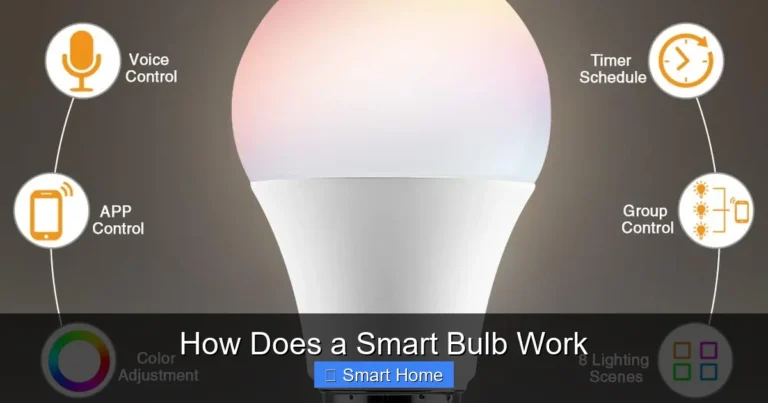
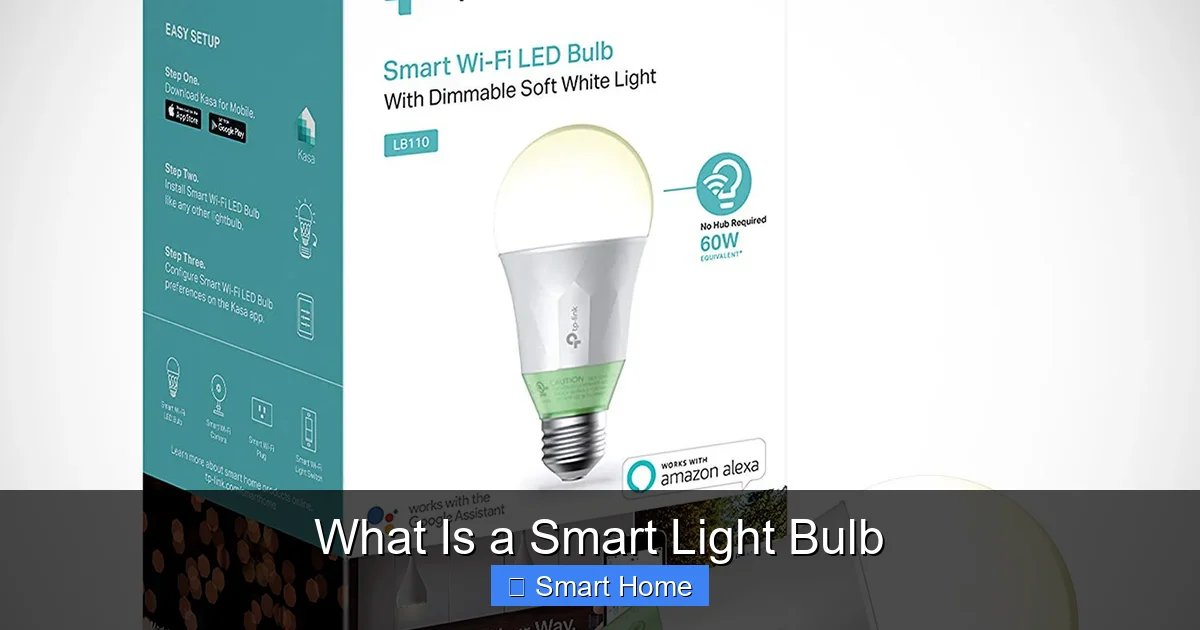
At their core, smart light bulbs are just like regular light bulbs—they produce light. But what sets them apart is the technology embedded inside. Most smart bulbs include a built-in Wi-Fi or Bluetooth module, a microcontroller, and sometimes even a Zigbee or Z-Wave radio for communication. These components allow the bulb to receive commands from your smartphone or voice assistant and adjust accordingly.
Connectivity Options
Smart bulbs use several methods to connect to your home network:
- Wi-Fi: Directly connects to your home Wi-Fi network. This means you can control the bulb from anywhere with an internet connection. However, it can increase your router’s load, especially with multiple bulbs.
- Bluetooth: Works without Wi-Fi, using short-range radio waves. Ideal for small setups or areas with poor Wi-Fi coverage. Control is limited to within range unless you use Bluetooth hubs or bridges.
- Zigbee/Z-Wave: These are mesh network protocols that allow bulbs to communicate with a central hub (like Philips Hue or Samsung SmartThings). They’re more energy-efficient and offer better range, making them ideal for larger smart home systems.
Control Interfaces
You can manage your smart bulbs through several interfaces:
- Mobile Apps: Each brand (like Philips Hue, LIFX, or Wyze) offers its own app for setup and control. These apps let you adjust brightness, color, and set schedules.
- Voice Assistants: Compatible with Amazon Alexa, Google Assistant, and Apple Siri. Just say a command like, “Hey Google, turn on the kitchen lights.”
- Smart Home Hubs: Devices like Amazon Echo (with built-in hub), Google Nest Hub, or dedicated hubs (like Philips Hue Bridge) centralize control for multiple devices.
- IFTTT and Automations: Use web-based applets (If This Then That) or platform-specific routines to create custom triggers—like turning on lights when motion is detected.
Power and Installation
Most smart bulbs use standard E26 or E12 bases, meaning they fit into regular light fixtures. Installation is as simple as screwing in a regular bulb—no rewiring or electrical work required. Some models even offer dimming capabilities without a dimmer switch, thanks to internal circuitry that mimics the behavior of a traditional dimmer.
Types of Smart Light Bulbs
Visual guide about What Is a Smart Light Bulb
Image source: png.pngtree.com
Not all smart light bulbs are created equal. They come in different technologies, features, and price points. Here’s a breakdown of the main types you’ll encounter:
Wi-Fi-Enabled Smart Bulbs
These bulbs connect directly to your home Wi-Fi network. You don’t need a separate hub, making them easy to set up. Brands like Wyze, TP-Link Kasa, and Govee offer affordable options. However, they rely on your router’s stability, and too many Wi-Fi bulbs can slow down your network.
Hub-Required Smart Bulbs
Bulbs like Philips Hue or LIFX (with Bridge) require a central hub to communicate with other devices. The hub connects to your router and acts as a bridge for the bulbs. This setup supports more complex automations and better reliability over larger areas. The trade-off is the extra cost of the hub.
Bluetooth-Only Smart Bulbs
These are the most budget-friendly and easiest to install. They work via Bluetooth and don’t need Wi-Fi. However, you must be within range to control them, and you’ll need a smartphone app. Brands like Sengled and IKEA Tradfri (with a gateway) fall into this category.
Zigbee and Z-Wave Smart Bulbs
These use low-power wireless protocols designed for smart homes. They require a hub but offer better range and battery efficiency. They’re ideal if you’re building a larger smart home ecosystem. Brands like Philips Hue and IKEA Tradfri support Zigbee.
Color-Changing vs. Tunable White
- Color-Changing Bulbs: Allow you to change the hue (e.g., red, blue, green) and saturation. Great for mood lighting, parties, or creative spaces.
- Tunable White Bulbs: Adjust only the color temperature—from cool blue (like daylight) to warm yellow (like a sunset). Ideal for reading, relaxing, or mimicking natural light cycles.
Benefits of Using Smart Light Bulbs
Visual guide about What Is a Smart Light Bulb
Image source: vhv.rs
Smart light bulbs aren’t just a tech upgrade—they offer real-world advantages that improve daily life.
Convenience and Control
With a smart bulb, you’re never far from your lights. Whether you’re in bed, on vacation, or stuck in traffic, you can turn them on or off from your phone. No more fumbling for switches in the dark or returning to a dark house.
Energy Efficiency
Most smart bulbs are LED-based, using up to 80% less energy than incandescent bulbs. Many also include motion sensors or scheduling features that automatically turn lights off when not needed. Some even track energy usage, helping you monitor and reduce consumption.
Enhanced Home Security
Use your smart bulbs to simulate occupancy. Set them to turn on and off at random intervals when you’re away. This deters potential intruders. You can also integrate them with motion sensors or cameras to trigger lights when someone enters a room.
Improved Sleep and Well-Being
Tunable white bulbs can mimic natural light cycles. Use a bright, cool light in the morning to wake you up, and switch to a warm, dim light in the evening to help your body wind down. Some bulbs even offer “sunrise simulation” to gently wake you.
Customization and Ambiance
Create the perfect mood for any occasion. Host a movie night with soft, dim lighting. Throw a party with vibrant colors. Or set a cozy reading nook with a warm, focused glow. The possibilities are endless.
Accessibility
For people with mobility issues or visual impairments, smart bulbs offer hands-free control. Voice commands or app-based adjustments make it easier to manage lighting without physical switches.
Integration with Smart Ecosystems
Smart bulbs are the backbone of many smart home setups. They work with thermostats, door locks, security cameras, and more. For example, you can set your lights to turn on when your door unlocks, or dim when the TV turns on.
Popular Smart Light Bulb Brands and Models
With so many options, choosing the right smart bulb can feel overwhelming. Here are some top brands and models, each with unique strengths:
Philips Hue
Considered the gold standard in smart lighting, Philips Hue bulbs are known for their reliability, color accuracy, and extensive app features. They require a Hue Bridge but offer thousands of color options, scheduling, and seamless integration with Alexa, Google Assistant, and Apple HomeKit. Ideal for users building a full smart home.
LIFX
LIFX bulbs don’t always require a hub (depending on the model), making them easier to set up. They offer bright, vivid colors and high brightness levels. The LIFX app is intuitive, and they support voice control and automation. Great for users who want high performance without extra hardware.
Wyze Bulb
Wyze offers affordable, Wi-Fi-enabled smart bulbs with excellent value. They’re compatible with Alexa and Google Assistant, support color changing, and include a built-in timer and scheduling. No hub required—just plug in and go. Perfect for budget-conscious smart home beginners.
Sengled Smart Bulbs
Sengled provides a range of Bluetooth and Wi-Fi bulbs at low prices. They’re easy to install and offer features like dimming, scheduling, and color changing. Some models include motion sensors. Good for small-scale setups or rental properties.
IKEA Tradfri
IKEA’s smart lighting system uses Zigbee and works with the free Tradfri app. The bulbs are affordable, energy-efficient, and available in warm white and color options. You’ll need a Tradfri Gateway, but the system integrates well with other IKEA smart products.
Govee
Govee offers colorful, affordable smart bulbs with music sync features. Their bulbs react to sound and beat, making them fun for parties or gaming setups. They’re Wi-Fi enabled and work with Alexa and Google Assistant.
How to Choose the Right Smart Light Bulb
With so many options, how do you pick the best smart bulb for your needs? Here’s what to consider:
Compatibility
Check if the bulb works with your existing smart home ecosystem. Do you have an Amazon Echo, Google Nest, or Apple HomeKit? Make sure the bulb supports your preferred voice assistant and app.
Brightness and Color
Look for bulbs with high lumens (brightness) and a wide color range. If you want vibrant colors, choose color-changing bulbs. If you prefer natural lighting, opt for tunable white.
Connectivity
Decide whether you want Wi-Fi, Bluetooth, or a hub-based system. Wi-Fi is great for remote access, Bluetooth for simplicity, and hubs for larger, more reliable setups.
Energy Efficiency
Choose LED bulbs—they’re more energy-efficient and last longer. Look for ENERGY STAR certification or similar ratings.
Price
Smart bulbs range from $10 to $50+. Budget brands like Wyze and Sengled offer great value, while premium brands like Philips Hue and LIFX cost more but deliver superior performance and features.
Additional Features
Consider extras like:
- Motion sensors
- Sunrise/sunset simulation
- Music sync
- Grouping and scenes
- Energy usage tracking
Setting Up Your Smart Light Bulbs
Getting started is surprisingly easy. Follow these steps to set up your smart bulbs:
Step 1: Choose Your Bulbs
Pick bulbs that match your needs and compatibility. Make sure you have the necessary app (e.g., Philips Hue, Wyze) and any required hubs (like the Hue Bridge).
Step 2: Install the Bulbs
Turn off the power, screw in the bulbs, and turn the power back on. Most bulbs will flash or change color to indicate they’re ready for setup.
Step 3: Download the App
Install the manufacturer’s app on your smartphone. Create an account and follow the setup wizard.
Step 4: Connect to Wi-Fi or Hub
For Wi-Fi bulbs, connect to your network. For hub-based systems, plug in the hub and connect it to your router. Then pair the bulbs through the app.
Step 5: Add to Voice Assistant
Link the app to your voice assistant (Alexa, Google, or Siri) through the assistant’s smart home settings. Now you can control the bulbs with voice commands.
Step 6: Create Scenes and Routines
Set up lighting scenes (e.g., “Movie Night” or “Dinner Party”) and automation routines (e.g., “Turn on lights at sunset”). Use the app or IFTTT for advanced triggers.
Pro Tips:
- Label your bulbs clearly in the app so you know which is which.
- Start with one room to avoid confusion.
- Use groups to control multiple bulbs at once.
- Update firmware regularly for best performance.
Smart Light Bulbs and Energy Savings
One of the biggest advantages of smart bulbs is their potential to reduce energy consumption. Here’s how:
LED Technology
Most smart bulbs use LED (light-emitting diode) technology, which uses up to 85% less energy than incandescent bulbs and lasts 25 times longer. This means lower electricity bills and less frequent replacements.
Scheduling and Automation
Set lights to turn off when you leave home or go to bed. Motion sensors can activate lights only when needed. These small habits add up to significant energy savings over time.
Dimming Features
Dimming uses less power. Many smart bulbs allow you to reduce brightness without changing the bulb’s wattage. For example, using a 60W equivalent bulb at 50% brightness uses less energy than a full 60W incandescent.
Energy Monitoring
Some smart bulbs (like Philips Hue) track energy usage in the app. This helps you monitor consumption and identify areas where you can save.
Real-World Impact
According to the U.S. Department of Energy, replacing five 60-watt incandescent bulbs with 9-watt LEDs saves about $75 per year. Add smart controls, and you’re saving even more by avoiding wasted light.
Common Misconceptions About Smart Light Bulbs
Despite their growing popularity, several myths persist about smart bulbs. Let’s clear them up:
Myth 1: Smart bulbs are too expensive
While premium models cost more, budget options from Wyze, Sengled, and TP-Link offer great features at under $10 per bulb. Over time, energy savings and convenience make them cost-effective.
Myth 2: They’re complicated to set up
Most smart bulbs are plug-and-play. The setup process takes 10–15 minutes, and apps are designed to be user-friendly.
Myth 3: They won’t work without Wi-Fi
Many bulbs use Bluetooth or Zigbee, which work without Wi-Fi. You just need to be near the bulb or use a hub.
Myth 4: They’re only for tech-savvy people
Smart bulbs are designed for everyone. Voice control, simple apps, and intuitive features make them accessible to all ages.
Myth 5: They’re a security risk
While any connected device can pose risks, reputable brands use encryption and regular updates to protect your data. Just keep your apps and firmware updated.
Future of Smart Light Bulbs
The future of smart lighting is bright—literally. Here’s what to expect:
AI and Machine Learning
Future bulbs may learn your habits and adjust automatically. For example, they could detect when you’re reading and increase brightness, or dim when you’re watching TV.
Health and Wellness Integration
Smart bulbs could sync with wearables to adjust lighting based on your heart rate or sleep patterns. Imagine lights that help regulate your circadian rhythm throughout the day.
Improved Interoperability
Standards like Matter (a new smart home protocol) will make it easier for bulbs from different brands to work together seamlessly.
Sustainability
Manufacturers are focusing on recyclable materials, longer lifespans, and energy-efficient designs to reduce environmental impact.
Integration with AR/VR
Imagine controlling your home’s lighting through virtual reality or using augmented reality to visualize how bulbs will look in your space before buying.
Frequently Asked Questions
Can I use smart light bulbs with regular light switches?
Yes, smart light bulbs work with standard switches. However, some dimming features may require a compatible dimmer switch or may not function properly with old dimmers. Always check the bulb’s specifications.
Do smart light bulbs work during power outages?
Most smart bulbs require power to function and won’t work during an outage. However, some models with battery backups or manual overrides may offer limited functionality.
Are smart light bulbs safe?
Yes, smart light bulbs are safe when used properly. They meet the same safety standards as traditional bulbs. Just avoid overheating by not covering them and follow manufacturer guidelines.
Can I control smart bulbs without internet?
Yes, if your bulb uses Bluetooth, you can control it within range without Wi-Fi. Some hubs (like Zigbee) also allow local control even when the internet is down.
How many smart bulbs can I connect to one hub?
It depends on the hub. Most hubs support 30–50 bulbs. Wi-Fi bulbs are limited by your router’s capacity and internet speed.
Do smart light bulbs increase electricity bills?
No, they typically reduce bills. LED smart bulbs use far less energy than incandescent bulbs. Automation and scheduling also prevent wasted light, saving even more energy.