How Bright Should a Desk Lamp Be
Choosing the right brightness for your desk lamp is crucial for eye comfort and productivity. It’s not about wattage anymore; it’s about lumens, with general tasks needing 300-500 lumens and detailed work requiring up to 750. Equally important is color temperature (measured in Kelvin), where cooler light (4000K-5000K) boosts focus and warmer light (2700K-3000K) is relaxing. The ideal lamp offers adjustable brightness and color, proper positioning to avoid glare, and a style that fits your space. Ultimately, the right light reduces eye strain and makes your workspace work for you.
Have you ever finished a long day at your desk feeling a peculiar kind of fatigue? Your back might be fine, and your tasks are done, but your eyes feel dry, heavy, and sore. You blame the screen, and rightly so, but what if the real culprit was sitting right there on your desk the whole time? Your desk lamp. The question of how bright should a desk lamp be is one of the most overlooked yet impactful elements of a healthy, productive workspace. It’s not just about seeing; it’s about seeing comfortably, clearly, and without punishment. Let’s shed some light on this essential home office accessory and turn that lamp from a potential hazard into your best work buddy.
Key Takeaways
- Brightness is measured in lumens, not watts: For most desk tasks, aim for a lamp that delivers between 300 and 750 lumens. Reading needs 300-500, while detailed drafting or design may require 500-750.
- Color temperature (Kelvin) affects mood and focus: Choose cooler light (4000K-5000K) for concentration and warmer light (2700K-3000K) for a cozy, relaxed feel. A 3500K-4000K neutral white is a great all-around choice.
- Adjustability is non-negotiable: Your ideal lamp should have both dimmable brightness and, ideally, adjustable color temperature to suit different times of day and tasks.
- Positioning prevents glare and shadows: Place the lamp to the side of your dominant hand (left for right-handers, right for left-handers) to avoid casting shadows on your work. The light source should be slightly above eye level.
- Lamp type matters for function and style: Swing-arm lamps offer maximum adjustability, while task lights with a weighted base are stable. Consider LED panels for uniform, shadow-free illumination over a large area.
- Match the lamp to your specific tasks: A coder, an artist, and a casual reader all have different lighting needs. Define your primary desk activity to find your perfect lumen and Kelvin range.
- Eye strain comes from poor lighting, not just screen time: Inadequate or overly harsh desk lighting is a major cause of headaches, fatigue, and dry eyes. The right lamp is a health necessity, not just a decor item.
📑 Table of Contents
Understanding Brightness: It’s All About the Lumens
Gone are the days of judging a bulb’s power by its wattage. A 60-watt incandescent bulb told you about energy use, not light output. Today, the universal standard for brightness is the lumen (lm). One lumen is equivalent to the light output of one candle. So, when shopping for a lamp or its bulb, lumens are the number you need to watch. But what do those numbers actually mean for your eyes?
The Lumen Spectrum for Desk Tasks
Desk work exists on a spectrum of visual demand. Tapping out an email is different from sketching architectural plans or soldering a tiny circuit. Here’s a practical breakdown:
- General Computer Work & Casual Reading (300-500 lumens): This is your baseline. Enough light to see your keyboard and a book comfortably without overwhelming your eyes or creating glare on your monitor. A standard 6-8W LED bulb typically falls in this range.
- Intense Reading & Writing (400-600 lumens): For sustained reading of dense text, journaling, or handwriting, you need a bit more punch to sharply define letters without squinting. This range prevents your eyes from constantly struggling to adjust.
- Detailed Manual Tasks (500-750+ lumens): This is for the artists, model builders, engineers, and anyone working with small parts, fine lines, or intricate detail. You need high, focused illumination to see textures and edges clearly. A lamp with 700 lumens focused on a small spot is a game-changer here.
A common mistake is using a single, very bright overhead light (like a 1500-lumen ceiling fixture) for everything. This creates glare, deep shadows under your chin and hands, and overall visual discomfort. The goal is task lighting—lighting only the area where you’re working. Your desk lamp should be a spotlight on your task, not a floodlight on your entire room.
Watts vs. Lumens: The Modern Conversion
If you’re still thinking in watts, here’s a quick cheat sheet for LED bulbs, which are now the standard for efficiency and longevity:
- 450 lumens ≈ 6W LED (old 40W incandescent)
- 800 lumens ≈ 10W LED (old 60W incandescent)
- 1100 lumens ≈ 15W LED (old 75W incandescent)
Most great desk lamps will either include an LED bulb or have one built-in. When buying a standalone LED bulb for a lamp, check the lumen rating on the package first.
The Color Temperature Factor: Warm vs. Cool Light
Brightness is only half the equation. The color of that light, measured in Kelvin (K), dramatically affects your mood, alertness, and even your circadian rhythm. Think of it as the “feel” of the light.
Visual guide about How Bright Should a Desk Lamp Be
Image source: m.media-amazon.com
Decoding the Kelvin Scale for Desks
- 2700K-3000K (Warm White): This is the cozy, inviting light of a traditional incandescent bulb or a sunset. It’s calming and pleasant, excellent for evening reading in a living room. However, for high-focus desk work, it can be too yellow and dimming, potentially making you feel sluggish. It’s best for a relaxed home office or a bedroom desk.
- 3500K-4000K (Neutral/Cool White): This is the gold standard for most desk tasks. It’s a clean, balanced white light that mimics natural daylight during the morning or late afternoon. It promotes alertness and clarity without the harsh, clinical edge of very cool light. This is what you want for writing, coding, studying, and general office work.
- 5000K-6500K (Daylight/ Cool Blue): This is bright, stark, blue-white light, similar to a noon sky. It maximizes contrast and is excellent for tasks requiring extreme visual acuity, like detailed drafting, graphic design, or intricate assembly work. However, prolonged exposure can be harsh and glaring, leading to eye fatigue and headaches for many people. Use it sparingly or only for short, intense bursts of work.
The Smart Solution: Tunable White & Circadian Lighting
The best modern desk lamps, especially those using smart LED technology, offer adjustable color temperature. This means you can set your lamp to a warm 2700K for an evening planning session and a cool 4000K for a morning report, all with the touch of a button or a voice command. This aligns your artificial lighting with your body’s natural rhythm. You can even find lamps that automatically shift color temperature throughout the day, getting cooler in the morning and warmer in the evening. This is a feature worth investing in, especially if you work long or irregular hours. For those interested in this tech, understanding how smart bulbs work can open up a world of customizable, health-focused lighting.
Task-Based Brightness Recommendations
Now, let’s get specific. What does your desk work actually require? Use this guide to find your lumen and Kelvin sweet spot.
Visual guide about How Bright Should a Desk Lamp Be
Image source: png.pngtree.com
For the Reader & Writer
Whether it’s devouring a novel or crafting a novel, you need steady, shadow-free light on your page or screen. 400-500 lumens at a 3000K-3500K color temperature is ideal. The light should be positioned to the side (see below) to avoid your hand casting a shadow over the text. A lamp with a slightly wider, diffused beam (like a fabric shade) can create a softer pool of light that’s easier on the eyes for long reading sessions than a pinpoint spotlight.
For the Computer Pro & Coder
This is a tricky balance. You need enough light to see your keyboard and documents, but not so much that it creates glare and reflections on your monitor, causing eye strain. The solution is indirect or backlighting. Your primary desk light should be 300-400 lumens at a 4000K neutral white, positioned so it hits your desk, not your screen. Consider a monitor light bar, which clips to the top of your screen and illuminates your keyboard and desk without any upward spill. For the room’s ambient light, a very low-level, warm overhead light can help reduce the overall contrast between the bright screen and dark surroundings.
For the Artist, Crafter & Detail-Oriented Professional
You need to see texture, color accuracy, and fine detail. This demands higher lumens (500-750+) and the highest possible color rendering index (CRI) (a rating of 90+ is excellent). Color temperature depends on your medium: 5000K daylight is best for accurate color matching in painting or graphic design, while 4000K might be sufficient for general crafting. A flexible, swing-arm lamp with a focused head is essential to direct light exactly where it’s needed without moving the entire lamp. For artists, the principles of good task lighting overlap with grow lighting—both require specific, intense spectra, though for different purposes.
Adjustability: The Secret to a Perfect Fit
No two desks, postures, or tasks are identical. A lamp that can’t move is a lamp that will force you into bad habits. Look for these key features:
- Multiple Joints (Swing-Arm): A lamp with at least two or three pivoting arms (base, upper arm, forearm) allows you to position the head exactly where you need it, high or low, close or far, without moving the heavy base. This is the gold standard for serious desk work.
- Dimmability: This is critical. Your needs change: a bright morning versus a dim evening, detailed work versus ambient light. A simple knob or touch-sensitive dimmer lets you fine-tune the output. Many smart lamps allow this via an app or voice control. If you use a smart bulb, ensure your lamp’s switch is always on and you control brightness via the bulb’s app; smart bulbs are almost always dimmable, but they require compatible wiring (no traditional dimmer switch).
- Head Rotation & Tilt: The lamp head should rotate 180 degrees and tilt up and down to direct the beam precisely.
- Cord Management: A long, flexible cord with a clip or guide keeps your desk tidy and prevents the cord from pulling the lamp out of position.
Lamp Types, Styles, and Placement
With your lumen and Kelvin numbers in mind, it’s time to pick a physical lamp that fits your desk and decor.
Visual guide about How Bright Should a Desk Lamp Be
Image source: png.pngtree.com
Popular Desk Lamp Styles
- Swing-Arm/Task Lamp: The classic workhorse. A weighted base, articulated arms, and a focused head. Perfect for serious work. Look for a stable base (metal or substantial resin) and smooth, sturdy joints.
- Arch Lamp: A single, curved arm that extends over your workspace. Saves desk space and provides a clean, minimalist look. Brightness and adjustability vary by model.
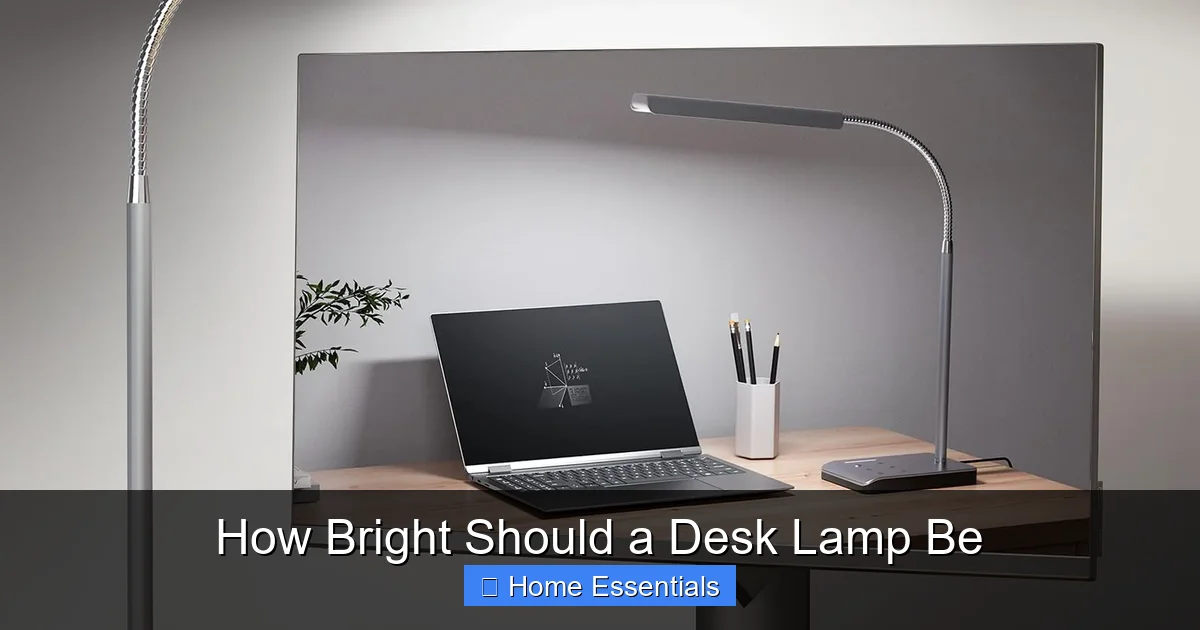
- Panel Light: A flat, rectangular LED panel. It provides excellent, uniform, shadow-free light over a wide area—great for artists or those with a large desk. Often has adjustable brightness and color temperature.
- Clip-On Lamp: Attaches to the edge of your desk or shelf. Frees up every inch of surface area. Ideal for small desks or as a secondary light source. Ensure the clip is robust and padded to avoid damage.
- Monitor Light Bar: Clips to the top of your computer monitor. It’s the ultimate solution for screen glare, as it lights your desk and keyboard from above and behind the screen, not in front of it.
The Golden Rule of Placement
Where you put the lamp matters as much as the lamp itself. Follow this simple rule: Place the light source on the opposite side of your dominant hand. If you’re right-handed, put the lamp on the left side of your desk, and vice versa. This prevents your hand and arm from casting shadows on your work as you write or use the mouse. The light should come from slightly above eye level and in front of you, not directly behind you (which creates a silhouette) or directly in front of you (which causes glare on screens). Experiment to find the angle where the light falls evenly on your work without reflecting off any glossy surfaces.
Common Mistakes & How to Avoid Them
Let’s fix the most frequent desk lighting blunders.
Mistake 1: Using Only Overhead Room Light
A single ceiling fixture, especially if it’s far from your desk, creates poor contrast, deep shadows under your brow and nose, and overall insufficient task lighting. Solution: Always use a dedicated task lamp for your primary work surface. The overhead light can provide general ambient fill, but your desk needs its own focused source.
Mistake 2: Ignoring Screen Glare
This is the #1 cause of digital eye strain. A bright lamp placed directly in front of your monitor will reflect in the screen. Solution: Use a lamp with a shade that directs light downward. Position it to the side. Consider a monitor light bar. You can also adjust your monitor’s tilt or use an anti-glare screen protector. Keeping your screen clean with a proper microfiber cloth also reduces scattered light and glare, so make that part of your routine.
Mistake 3: Choosing Style Over Substance
A beautiful, minimalist lamp with a tiny, non-adjustable head might look great in a photo but is useless for actual work. Solution: Prioritize function first. Get the adjustability, brightness, and color temperature you need. Then, find the most aesthetically pleasing option that meets those functional criteria.
Mistake 4: Forgetting About Maintenance
Dust and grime on a lamp shade or bulb significantly reduce light output. A dirty shade can cut brightness by 50% or more. Solution: Make dusting your lamp part of your weekly cleaning routine. Use a soft microfiber cloth or duster to wipe down the shade and bulb (when cool). For deeper cleaning, learn how to properly wash your microfiber duster to keep it effective, and use a slightly damp cloth for the lamp base. A clean lamp is a bright lamp.
Conclusion: Light Up Your Work, Not Your Eyes
Figuring out how bright your desk lamp should be isn’t a guessing game; it’s a science with simple, practical rules. Start with 400-500 lumens and a 3500K-4000K neutral white for a fantastic all-purpose setup. From there, adjust based on your specific tasks—more lumens for detail, warmer light for relaxation, cooler light for sharp focus. Invest in a lamp with full adjustability and place it correctly on the opposite side of your writing hand. By treating your desk lamp as the critical ergonomic tool it is—not just a decorative afterthought—you’ll protect your eyes, boost your concentration, and make hours at your desk feel easier and more productive. Your future self, with its clear eyes and focused mind, will thank you.
Frequently Asked Questions
How many lumens do I really need for a desk lamp?
For most general desk work like writing or computer use, 300-500 lumens is sufficient. For detailed work like drawing or crafts, aim for 500-750 lumens. The key is using a focused task light rather than a single bright overhead bulb.
What color temperature is best for my eyes at a desk?
>A neutral white light between 3500K and 4000K is generally best for desk work. It’s bright enough to be alerting without the harsh, blue-rich glare of 5000K+ daylight bulbs, which can cause eye strain over time.
Can a desk lamp be too bright?
Yes. A lamp that is excessively bright, especially if it’s a cool/blue white, can cause glare, headaches, and eye fatigue. It can also create harsh shadows. Always use a dimmable lamp and set the brightness to a comfortable level where you can see clearly without squinting or feeling discomfort.
Should I get an LED or halogen bulb for my desk lamp?
Always choose an LED bulb. LEDs are far more energy-efficient, last vastly longer (15,000-25,000 hours vs. 1,000-2,000 for halogen), produce less heat, and are available in every lumen output and color temperature you need. Modern LEDs also have excellent color rendering.
Where exactly should I position my desk lamp?
Place the lamp on the side opposite your dominant hand (left side for right-handers). The light should come from in front of you and slightly above eye level. This prevents your hand from casting shadows on your work and minimizes glare on screens.
Are smart bulbs a good option for desk lamps?
Yes, smart bulbs are excellent for desk lamps. They allow you to easily adjust brightness and color temperature via an app or voice, creating the perfect light for any task or time of day. Just ensure your lamp’s switch stays on and you control it through the smart system. You can connect a smart bulb to Alexa or Google Home for hands-free control.