What Should a Study Desk Have
A well-designed study desk is the cornerstone of an effective learning or working environment. It must combine ergonomic adjustability, ample and smart storage solutions, proper task lighting, and efficient cable management to support focus and physical well-being. Choosing durable materials and personalizing the space further enhances daily productivity and comfort.
Think about your favorite place to study or work. What does it feel like? Is it a chaotic jumble of books, cables, and coffee mugs, or is it a calm, organized haven where your mind can focus? The difference often comes down to one piece of furniture: your study desk. It’s not just a table; it’s your command center, your thinking space, and your launchpad for ideas. But what separates a truly great study desk from just a surface to put your laptop on? It’s a thoughtful blend of ergonomics, storage, lighting, and personal touches. Let’s break down exactly what a study desk should have to transform your productivity and well-being.
Key Takeaways
- Ergonomic Adjustability is Non-Negotiable: Your desk height and surface should allow your elbows to rest at a 90-degree angle with feet flat on the floor, promoting healthy posture during long study sessions.
- Surface Area and Depth Matter: Ensure the desk provides enough space for your computer, writing tasks, and reference materials without feeling cramped, with a minimum depth of 24 inches for monitor placement.
- Integrated Storage Saves Mental Energy: Built-in drawers, shelves, or nearby filing units keep essentials within reach but out of visual clutter, reducing distractions.
- Task Lighting is Critical for Eye Health: A dedicated, adjustable lamp with the right color temperature (4000K-5000K) prevents glare and eye strain, complementing overhead room lighting.
- Cable Management is Part of the Design: Plan for grommets, trays, or clips to route cords neatly; a tangled cord ecosystem is a major source of visual chaos and frustration.
- Material Choice Impacts Durability and Mood: Solid wood offers longevity and warmth, while laminates provide easy maintenance. Choose a finish that inspires you and withstands daily use.
- Personalization Boosts Motivation: Incorporate elements like a vision board, plant, or meaningful object to make the space genuinely yours and encourage consistent use.
📑 Table of Contents
- The Foundation of Comfort: Ergonomic Essentials
- Sizing It Up: Surface Area and Space Considerations
- Beyond the Surface: Intelligent Storage Solutions
- See Clearly, Work Brightly: The Right Lighting Setup
- Taming the Cord Jungle: Essential Cable Management
- Material Matters: Durability, Aesthetics, and Maintenance
- Making It Yours: Personalization and Final Touches
- Conclusion: Your Desk, Your Productivity Powerhouse
The Foundation of Comfort: Ergonomic Essentials
Before we talk about drawers or decor, we must talk about your body. A study desk that forces you into a slouch, craned neck, or aching wrists is a productivity killer in disguise. Ergonomics isn’t a luxury; it’s the baseline requirement.
Finding Your Perfect Desk Height
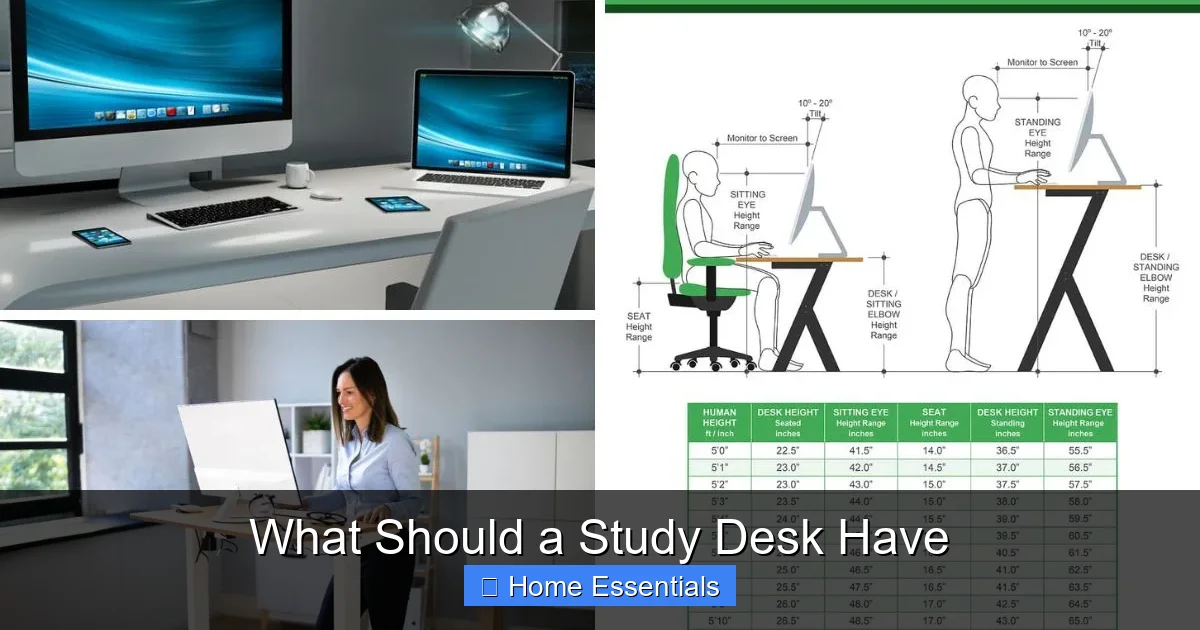
The standard desk height is around 29-30 inches, but this is a one-size-fits-none approach. Your ideal height depends entirely on your own body. When sitting, your thighs should be parallel to the floor, your knees at a 90-degree angle, and your feet flat on the ground (or on a footrest). Your elbows should also be at a 90-degree angle when your hands are on the keyboard or desk surface, with your forearms parallel to the floor. If your desk is too high, your shoulders will rise, causing tension. Too low, and you’ll hunch forward. An adjustable sit-stand desk is the gold standard, allowing you to switch positions throughout the day, but a fixed-height desk must be chosen with your specific chair and body proportions in mind.
Chair Compatibility and Clearance
Your desk and chair are a team. Ensure there’s adequate clearance under the desk for your legs and chair to fit comfortably. You should be able to move your chair in and out easily and have enough knee room. A common mistake is buying a beautiful desk with a solid apron or panel that leaves no space for your legs, forcing you to sit too far away and overreach. Always check the under-desk clearance measurement.
Monitor and Keyboard Placement
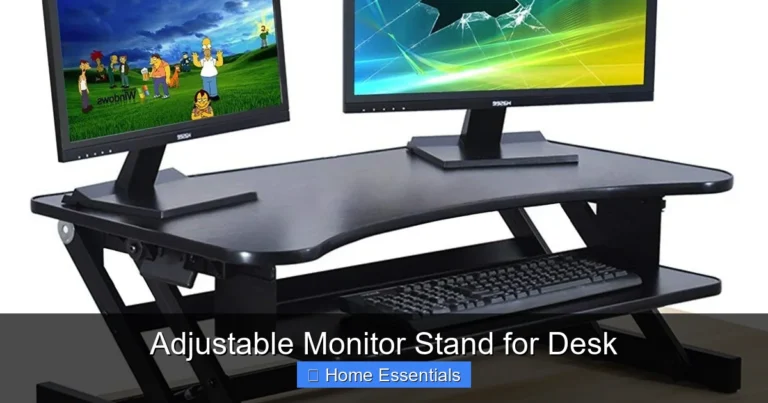
The desk’s surface dictates your setup. Your monitor’s top should be at or slightly below eye level, about an arm’s length away. This means your desk needs enough depth to push the monitor back while leaving room in front for your keyboard and mouse. A depth of at least 24 inches is recommended. Your keyboard and mouse should be placed so your wrists are straight and not bent upward. A keyboard tray can be a great solution for fixed-height desks to achieve the correct angle, but it reduces usable desk surface.
Sizing It Up: Surface Area and Space Considerations
Even with perfect ergonomics, a desk that’s too small will create a different kind of stress: the stress of constant clutter and lack of room to think. Size matters, but it’s about more than just footprint.
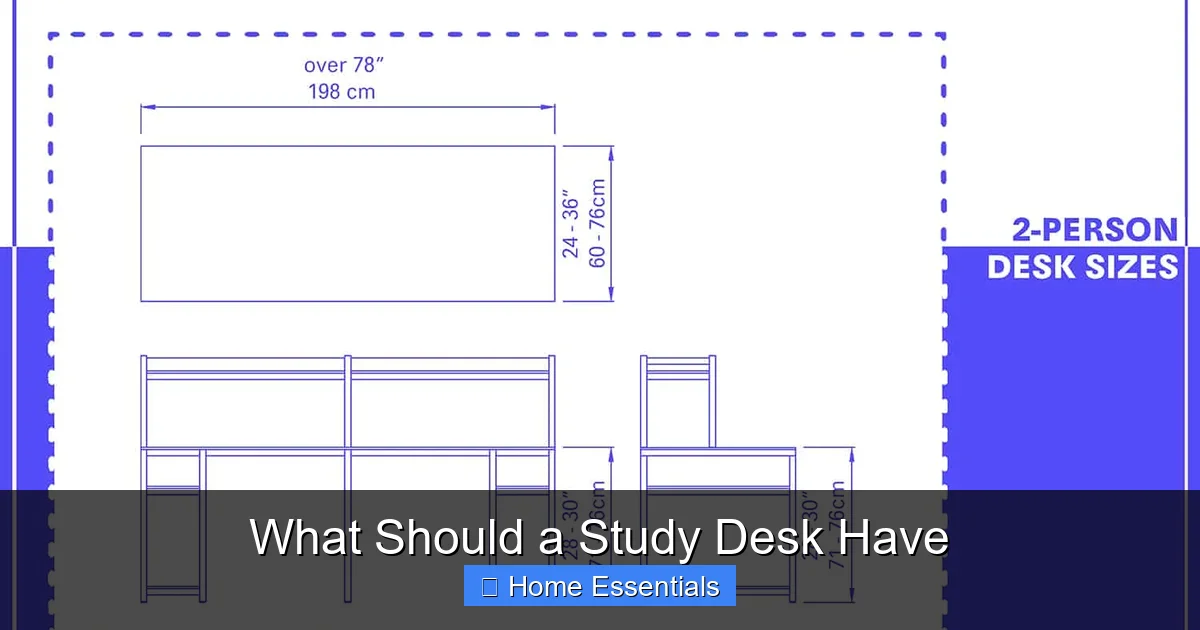
Visual guide about What Should a Study Desk Have
Image source: homenish.com
Minimum Viable Dimensions
For a single user with a laptop and a notebook, a desk width of 48 inches and depth of 24 inches is a good starting point. This allows a laptop, a lamp, a notepad, and a cup of coffee without everything being jammed together. For multiple monitors or extensive paper-based work, aim for 60+ inches in width. Remember to measure the space where the desk will go! Allow for at least 36 inches of clearance behind the chair for movement and for pulling out the chair fully.
Shape and Layout Options
Rectangular desks are the most common and efficient. L-shaped desks provide a fantastic “cockpit” feel, separating your primary computer work area from a secondary space for reading or writing, which can mentally compartmentalize tasks. Corner desks are ideal for maximizing small spaces. Consider your workflow: do you need everything within a semi-circle (L-desk) or are you fine with a linear arrangement? Also, think about whether you want a desk with a built-in hutch (which adds storage but can feel bulky) or a clean, open look.
Beyond the Surface: Intelligent Storage Solutions
Clutter is the enemy of focus. A study desk should have a plan for all the little things: pens, highlighters, sticky notes, staplers, books, and files. Storage isn’t about hiding everything; it’s about giving every item a logical home so you can find it in seconds.

Visual guide about What Should a Study Desk Have
Image source: deskadvisor.org
Built-in vs. Freestanding Storage
Many desks come with one or two shallow drawers. These are perfect for pens, paperclips, and notepads—your daily grab-and-go items. Deeper file drawers are excellent for hanging folders of active projects. However, don’t rely solely on the desk’s built-in storage. A combination works best: use the desk’s drawers for immediate needs, and add a freestanding filing cabinet or a set of shelves beside or behind the desk for less-frequently accessed materials, books, and archives. This keeps your immediate desk surface clear.
The Power of Vertical Space
Don’t forget the space above your desk! A wall-mounted shelf, a small bookcase, or a desk hutch can hold reference books, binders, and decorative items, freeing valuable desk real estate. However, be cautious with items directly behind your monitor; they can create visual distraction. Use vertical storage for items you need to access but don’t use every single minute.
Desk Organizers and Trays
For the items that must stay on the surface, use organizers. A simple desktop organizer with compartments for pens, a phone stand, a spot for your wallet and keys, and a small tray for incoming/outgoing papers can work wonders. The goal is a “clean sheet” policy at the end of each day: the only things left out are your computer, a lamp, and perhaps one personal item. Everything else has a designated slot or drawer.
See Clearly, Work Brightly: The Right Lighting Setup
Eye strain, headaches, and fatigue are often directly linked to poor lighting. Your study desk needs two types of light: general ambient light from the room and a dedicated task light focused on your work surface.
Visual guide about What Should a Study Desk Have
Image source: homestratosphere.com
Choosing the Perfect Task Lamp
A good desk lamp is adjustable—both in height and in the lamp head’s direction. It should shine on your work without causing glare on your screen. Look for a lamp with a shade that directs light downward. The color temperature is crucial: warmer light (2700K-3000K) is relaxing but can make you drowsy; cooler, daylight-like light (4000K-5000K) mimics natural daylight and promotes alertness and focus, making it ideal for studying and detailed work. The lamp should be placed on the side opposite your dominant hand to avoid casting shadows (e.g., if you’re right-handed, place the lamp on the left side of your desk).
Integrating Smart Lighting for Flexibility
This is where technology can shine—literally. Consider smart bulbs for your task lamp or overhead room lighting. These allow you to adjust brightness levels and color temperature with an app or voice command. Need bright, cool light for a morning study session? Set it. Want a warmer, dimmer glow for an evening review? Change it instantly. This adaptability helps match your lighting to the time of day and the specific task, reducing eye strain significantly. For a seamless smart home setup, you can even find smart bulbs compatible with Alexa or other assistants for hands-free control. Ensure your smart bulb choice aligns with your fixture; for example, some smart bulbs are designed to work with existing dimmer switches, offering a simple upgrade path.
Managing Glare and Shadows
Position your desk perpendicular to windows, not with a window directly behind you (which creates glare on your screen) or directly in front of you (which causes you to squint). Use blinds or curtains to control natural light. Your monitor should also have an anti-glare screen if necessary. The combination of proper positioning and adjustable artificial light is the key to a consistently well-lit workspace.
Taming the Cord Jungle: Essential Cable Management
A spaghetti pile of cords under and behind your desk is more than an eyesore; it’s a dust magnet, a fire hazard if overloaded, and a constant source of frustration when you need to plug something in. A clean desk starts with clean cord management.
Plan Your Power from the Start
Before you even plug anything in, map it out. How many devices do you have? Laptop, phone charger, lamp, monitor, perhaps a printer? Use a power strip with a long cord, but don’t hide it under a rug. Place the power strip where it can reach all your devices and be easily accessed, ideally mounted to the underside of the desk or leg using adhesive strips or a small shelf. This gets it off the floor and out of sight.
Tools of the Trade
Invest in simple cable management tools. Adhesive-backed cable clips stuck to the underside of your desk can route cords along neat paths. Fabric or braided sleeves can bundle multiple cords together. Desk grommets (the little plastic or metal rings) are fantastic if your desk has a hole or two—they let you feed cords through the surface for a super clean look from above. A simple under-desk tray can hold a power strip and bundle of cords, hiding them completely. Labeling cords with washi tape or tags is a small step that saves massive time when troubleshooting.
Material Matters: Durability, Aesthetics, and Maintenance
The surface you work on every day should inspire you and stand up to the test of time. The material of your study desk affects its look, feel, longevity, and how easy it is to keep clean.
Solid Wood: The Classic Choice
Desks made from oak, walnut, maple, or cherry are beautiful, durable, and can last a lifetime. They have a warm, natural feel and can be refinished if scratched. However, solid wood is heavy, can be sensitive to humidity changes (causing warping), and requires more care (avoiding direct sunlight, using coasters). It’s an investment piece.
Engineered Wood and Laminate: Practical and Affordable
Particleboard or MDF (medium-density fiberboard) with a laminate or veneer finish is the most common and affordable option. Modern laminates are incredibly durable, scratch-resistant, stain-resistant, and come in a vast array of colors and finishes, including realistic wood grains. They are easy to wipe clean with a damp cloth, making them ideal for high-use spaces. The downside is they can’t be refinished and the edges can be susceptible to water damage if not sealed properly.
Metal and Glass: Modern and Minimalist
Metal frames (often steel) offer excellent stability and a industrial look. Glass tops create an open, light feeling but show fingerprints and smudes instantly and can be a safety concern if not tempered. These materials are often combined, like a wood top with metal legs. Consider the weight capacity if you have heavy equipment like multiple monitors.
Regardless of material, ensure the finish is smooth and scratch-resistant. You’ll be writing and resting your arms on it constantly. A quick daily wipe with a soft cloth is all that’s needed for maintenance. Avoid harsh chemical cleaners that can damage finishes. For wood, a specialized furniture polish occasionally is beneficial. For a quick dusting, a microfiber duster is perfect as it traps dust without scratching the surface.
Making It Yours: Personalization and Final Touches
Your study desk should be a place you *want* to be. Once the functional boxes are checked, it’s time to add the elements that spark joy and motivation.
Greenery and Air Quality
A small potted plant—a snake plant, pothos, or succulent—adds life, improves air quality, and provides a natural break for your eyes. Just ensure it doesn’t require constant watering that might risk spills on your electronics.
Inspiration Within Sight
Use a small bulletin board, a framed photo, or a vision board on the wall above or beside your desk. These visual cues can remind you of your goals, provide a moment of positivity, or hold essential reference charts you glance at often.
Comfort Beyond the Desk
Don’t forget the accessories that support your body. A comfortable, supportive chair is the most important companion to your desk. A footrest can help if your feet don’t reach the floor. A monitor stand or laptop riser can achieve the perfect screen height. A soft mousepad with wrist support can prevent strain. These are not desk features per se, but they are essential components of the total “study desk” ecosystem.
Conclusion: Your Desk, Your Productivity Powerhouse
Building the perfect study desk setup is an investment in yourself. It’s about creating a physical environment that removes friction and supports your best work. Start with the non-negotiables: a height that promotes good posture and a surface that fits your tools. Then, layer on smart storage to conquer clutter, invest in lighting that protects your eyes, and wrangle those cables into submission. Choose a material that fits your style and durability needs. Finally, infuse the space with personality so it feels like a sanctuary, not just a workstation. Remember, the goal is a space where your mind is free to focus, create, and achieve, unburdened by physical discomfort or visual chaos. Your ideal study desk isn’t found in a catalog; it’s built by thoughtfully considering how *you* work and what *you* need to thrive.
Frequently Asked Questions
What is the ideal height for a study desk?
The ideal height allows your elbows to rest at a 90-degree angle when your hands are on the keyboard or desk, with your feet flat on the floor. For most people, this is between 24 and 30 inches, but an adjustable sit-stand desk offers the most flexibility for different tasks and body types.
What material is best for a study desk?
There is no single “best” material. Solid wood offers beauty and longevity but requires care. Laminate or veneer over engineered wood is highly durable, affordable, and easy to clean, making it a popular practical choice. Metal frames provide stability, often combined with a wood or glass top. Choose based on your budget, aesthetic preference, and desired maintenance level.
How can I keep my study desk organized?
Start by removing everything and only keeping absolute essentials on the surface. Use drawers for daily items like pens and notepads. Add a desktop organizer for small tools. Implement a “clean sheet” policy at the end of each day. Utilize vertical space with shelves for books and archives, and always have a designated “home” for every item to prevent future clutter.
Are drawers necessary on a study desk?
While not strictly necessary, at least one or two shallow drawers are highly recommended. They provide instant, hidden storage for the small items you use constantly—pens, highlighters, paperclips, sticky notes—keeping your desk surface clear and your workflow uninterrupted without needing to stand up.
How do I choose the right lighting for my study desk?
Combine general room lighting with a dedicated, adjustable task lamp. The lamp should have a shade that directs light downward to avoid screen glare. Choose a color temperature of 4000K-5000K (cool white/daylight) for alertness during work. Position the lamp on the side opposite your dominant hand to minimize shadows. Smart bulbs offer easy adjustment of brightness and color temperature.
How often should I clean my study desk?
For maintenance, a quick daily wipe-down with a dry or slightly damp microfiber cloth removes dust and spills. Perform a deeper clean weekly, removing all items to dust every surface, organize cables, and declutter. This prevents dust buildup, protects your desk’s finish, and maintains an environment conducive to focus.