What Smart Bulbs Work with Ring
Smart bulbs and Ring devices can work together to make your home smarter and safer. You can use smart bulbs to light up your porch when motion is detected or set them to turn on when your Ring doorbell rings. This article shows you exactly which smart bulbs work with Ring and how to connect them easily. You’ll learn setup tips, best brands, and creative ways to improve your home security with lighting.
Key Takeaways
- Ring works best with Wi-Fi smart bulbs: Only bulbs that connect to your home Wi-Fi can be controlled by Ring through the Ring app or Alexa integration.
- Popular compatible brands include Philips Hue, LIFX, and TP-Link Kasa: These brands offer reliable smart bulbs that work smoothly with Ring’s ecosystem.
- Use Alexa for seamless control: Most Ring-compatible smart bulbs work with Amazon Alexa, allowing you to use voice commands and routines.
- Create custom lighting routines: Set bulbs to turn on when motion is detected or when your Ring camera sees activity.
- Check for local hub support: Some bulbs like Philips Hue need a hub, while others like LIFX work directly with Wi-Fi and Alexa.
- Ensure firmware updates: Keep both your Ring app and smart bulb apps updated for the best performance and compatibility.
- Security cameras and lighting go hand in hand: Smart lighting can deter intruders and improve visibility when Ring cameras detect motion.
📑 Table of Contents
- What Smart Bulbs Work With Ring?
- Why Combine Smart Bulbs with Ring?
- How Ring Interacts with Smart Bulbs
- Top Smart Bulbs That Work With Ring
- Setting Up Smart Bulbs with Ring: A Step-by-Step Guide
- Creative Ways to Use Smart Bulbs with Ring
- Tips for Maximizing Performance
- Common Myths About Smart Bulbs and Ring
- Future of Smart Bulbs and Ring Integration
- Conclusion
What Smart Bulbs Work With Ring?
Imagine this: You’re at home, and your Ring doorbell just chimes. A minute later, the porch light turns on automatically—not because you flipped a switch, but because your smart home system detected motion and triggered the light. That’s the magic of integrating smart bulbs with Ring devices. It’s not just about convenience; it’s about making your home smarter, safer, and more efficient. But before you run out and buy a smart bulb, you might be wondering: What smart bulbs work with Ring?
In this guide, we’ll walk you through everything you need to know about connecting smart bulbs to your Ring system. From understanding compatibility to setting up automated lighting routines, we’ll cover it all. Whether you’re a tech newbie or a smart home pro, you’ll find practical tips and real-world examples to help you create a smarter home.
Why Combine Smart Bulbs with Ring?
At first glance, smart bulbs and Ring security devices might seem like separate tools. But when you connect them, they become a powerful team. Ring cameras, doorbells, and security lights can trigger smart bulbs to turn on, change colors, or even flash red when motion is detected. This integration adds a new layer of security and convenience to your home.
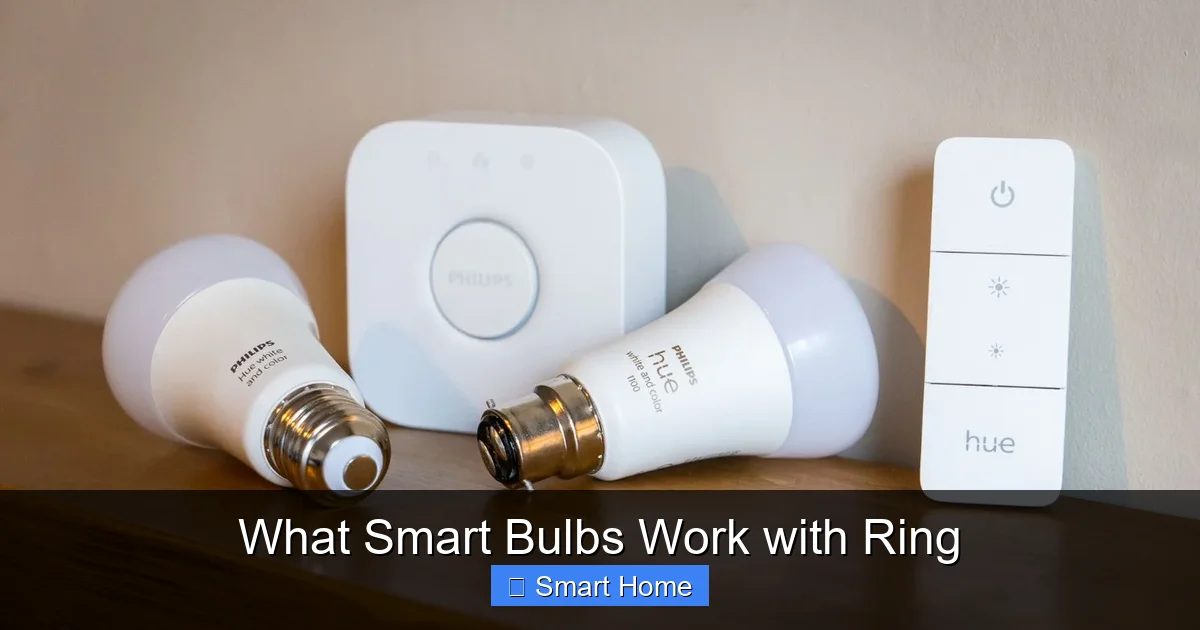
Visual guide about What Smart Bulbs Work with Ring
Image source: robots.net
Enhanced Security
One of the biggest benefits of combining smart bulbs with Ring is improved security. When your Ring camera detects motion at night, it can trigger nearby smart bulbs to turn on. This deters potential intruders and helps you see clearly if someone is approaching your home. It’s like having a security guard who turns on the lights when danger is near.
Energy Savings
Smart bulbs are energy-efficient, and when paired with Ring, they can be used only when needed. For example, a porch light might stay off during the day but turn on only when motion is detected at night. This reduces unnecessary energy use and lowers your electricity bill.
Convenience and Automation
No more fumbling for light switches in the dark. With smart bulbs and Ring, your lights can respond to your daily routines. You can set up routines so that when your Ring doorbell rings, the hallway light turns on. Or, if your Ring camera sees someone at the back door, the outdoor smart bulb can flash a warning color.
Customization
Smart bulbs offer a wide range of colors and brightness levels. You can set them to warm white for a cozy feel or bright white for security. Some even change colors to signal different events—like turning blue when your Ring camera detects a person and red when it detects a vehicle.
How Ring Interacts with Smart Bulbs
Ring devices don’t control smart bulbs directly. Instead, they work through third-party platforms like Amazon Alexa. When you connect both your Ring devices and smart bulbs to Alexa, you can create routines and automations that link them together.
The Role of Amazon Alexa
Alexa acts as the bridge between Ring and smart bulbs. Most Ring-compatible smart bulbs are also Alexa-compatible. This means you can use Alexa to link your Ring camera’s motion alerts to your smart bulb’s actions. For example, you can say, “Alexa, if my Ring camera sees motion, turn on the front porch light.”
Using the Ring App and Alexa App
To set up automation, you’ll use both the Ring app and the Alexa app. In the Alexa app, go to “Routines” and create a new routine. Choose a trigger (like “When motion is detected” from your Ring device) and an action (like “Turn on the porch light”). This creates a seamless connection between your Ring device and your smart bulb.
Limitations to Keep in Mind
Not all smart bulbs work with Ring. Only those that are Wi-Fi enabled and compatible with Alexa can be linked. Bulbs that require a separate hub (like some older Philips Hue models) may not work unless the hub is also connected to Alexa. Always check compatibility before purchasing.
Top Smart Bulbs That Work With Ring
Not all smart bulbs are created equal. Some work better with Ring than others. Here are the top brands and models that are known for their compatibility and performance.
Philips Hue
Philips Hue is one of the most popular smart lighting brands. Their bulbs work with Alexa, so they can be easily integrated with Ring devices. However, most Hue bulbs require a Hue Bridge (hub) to connect to Wi-Fi. Once the bridge is set up and linked to Alexa, you can create routines that connect your Ring camera to your Hue lights.
Example: Set your Ring camera to trigger a Hue light to turn on when motion is detected after dark.
Hue also offers color-changing bulbs, so you can set your porch light to flash red when your Ring camera detects a person—adding a visual alert without extra devices.
LIFX
LIFX bulbs are known for their brightness and color range. The best part? They don’t need a hub. LIFX bulbs connect directly to your Wi-Fi network and work with Alexa. This makes them ideal for Ring integration because you don’t need extra hardware.
Tip: Use LIFX bulbs in areas where you want instant lighting response. Since they don’t rely on a hub, they’re faster and more reliable for automation.
TP-Link Kasa
TP-Link Kasa offers affordable smart bulbs that are easy to set up and work well with Alexa. Their bulbs are Wi-Fi enabled and don’t require a hub, making them a great choice for Ring users who want simplicity.
Best for: Budget-conscious users who want reliable performance and easy automation with Ring.
GE C by GE
GE C by GE bulbs are designed specifically for Alexa and work seamlessly with Ring through Alexa routines. They offer voice control, scheduling, and automation—perfect for linking with Ring motion alerts.
Pro Tip: Use GE C by GE bulbs in your living room or bedroom to create a relaxing atmosphere that turns on automatically when your Ring doorbell rings.
Nanoleaf Essentials
Nanoleaf bulbs are sleek, modern, and work with Alexa. They’re especially good for ambient lighting and can be used creatively with Ring. For example, you can set them to turn on and change color when your Ring camera detects motion.
Design Note: Nanoleaf bulbs are often used in trendy homes and can add a stylish touch to your smart lighting setup.
Setting Up Smart Bulbs with Ring: A Step-by-Step Guide
Ready to connect your smart bulbs to your Ring system? Here’s a simple step-by-step guide to get everything working together.
Step 1: Choose Compatible Smart Bulbs
Start by picking smart bulbs that are Alexa-compatible and Wi-Fi enabled. Avoid bulbs that require a separate app or don’t support voice control.
Step 2: Install the Bulbs
Turn off the power, screw in the smart bulbs, and turn the power back on. Make sure your bulbs are recognized in the manufacturer’s app (like Philips Hue or LIFX app).
Step 3: Connect to Amazon Alexa
Open the Alexa app, go to “Devices,” and add your smart bulbs. Follow the prompts to link your bulb’s brand account to Alexa.
Step 4: Set Up Ring in Alexa
In the Alexa app, search for “Ring” and link your Ring account. Once connected, Alexa can see your Ring devices.
Step 5: Create a Routine
Go to “Routines” in the Alexa app. Create a new routine and set the trigger to “When motion is detected” from your Ring device. Set the action to “Turn on [smart bulb].”
Step 6: Test It
Walk in front of your Ring camera or press the doorbell to test the automation. The smart bulb should turn on automatically.
Troubleshooting Tips
- If the bulb doesn’t respond, check that both the bulb and Ring are linked to the same Amazon account.
- Make sure your Wi-Fi signal is strong where the bulb is located.
- Update the firmware in both the bulb app and the Ring app.
Creative Ways to Use Smart Bulbs with Ring
Once you’ve set up your smart bulbs and Ring devices, the possibilities are endless. Here are some creative ways to use them together.
Nighttime Motion Alerts
Set your smart bulb to turn on only when your Ring camera detects motion after sunset. This saves energy and ensures you only use light when needed.
Color-Coded Notifications
Use color-changing bulbs to signal different events. For example, turn blue when a person is detected and red when a vehicle is seen. This gives you instant visual feedback.
Security Light Automation
Install a smart bulb in your garage or backyard. When your Ring camera detects motion, the bulb turns on for 30 seconds to scare off intruders.
Welcome Home Routine
Set up a routine where your Ring doorbell triggers a smart bulb to turn on when you arrive home. This helps you see clearly when you enter, especially at night.
Holiday Themes
Change your smart bulb colors to match the season. When your Ring camera sees someone at the door during the holidays, the bulb can flash festive colors.
Tips for Maximizing Performance
To get the most out of your smart bulbs and Ring integration, follow these best practices.
Use Strong Wi-Fi
Smart bulbs need a stable Wi-Fi connection. Place your router or extender near the bulbs to ensure strong signal strength.
Update Regularly
Keep your Ring app, Alexa app, and bulb firmware updated. Updates often include bug fixes and new features that improve compatibility.
Limit Routines
Too many routines can slow down your devices. Keep only the ones you use regularly.
Use a Smart Plug for Non-Bulbs
If you want to control non-bulb devices (like a lamp or fan), use a smart plug. Most smart plugs work with Alexa and can be triggered by Ring.
Group Devices
In the Alexa app, group your smart bulbs by room. This makes it easier to control multiple lights at once.
Common Myths About Smart Bulbs and Ring
There are a lot of misconceptions about smart bulbs and Ring. Let’s clear them up.
Myth: All Smart Bulbs Work with Ring
Fact: Only Wi-Fi bulbs that work with Alexa can be integrated with Ring. Bulbs that require a separate app or don’t support voice control won’t work.
Myth: You Need a Hub for Every Bulb
Fact: Some bulbs like LIFX and TP-Link Kasa work directly with Wi-Fi and Alexa—no hub needed.
Myth: Ring Directly Controls Smart Bulbs
Fact: Ring works through Alexa. The connection is indirect but powerful.
Myth: Smart Bulbs Are Too Expensive
Fact: Prices have dropped. Many affordable options like TP-Link and GE C by GE offer great value.
Myth: It’s Too Hard to Set Up
Fact: With clear instructions and the right bulbs, setup takes less than 30 minutes.
Future of Smart Bulbs and Ring Integration
The smart home industry is growing fast. In the future, we can expect even deeper integration between Ring and smart bulbs.
AI-Powered Detection
Future Ring cameras may use AI to distinguish between people, pets, and cars. This could trigger different lighting responses—like turning on a warm light when a person is detected and a bright white light when a car is seen.
Voice-Free Automation
Soon, you might be able to set up automations directly in the Ring app without using Alexa. Imagine creating a routine in Ring that turns on your smart bulb when motion is detected—no third-party app needed.
Energy Monitoring
Smart bulbs could report energy usage to your Ring app, helping you track and reduce consumption.
Voice Assistant Integration Beyond Alexa
Ring may eventually support Google Assistant and Siri, expanding compatibility with even more smart bulbs.
Conclusion
Integrating smart bulbs with Ring isn’t just a tech upgrade—it’s a lifestyle upgrade. You’re not just adding lights; you’re building a smarter, safer, and more responsive home. With the right bulbs and a few simple steps, you can turn your Ring camera’s alerts into visual cues, automate your lighting, and enjoy peace of mind.
Whether you choose Philips Hue for its color range, LIFX for its ease of use, or TP-Link Kasa for affordability, the key is compatibility with Alexa. Once connected, the possibilities are endless: motion-triggered lights, color-coded alerts, and energy-saving routines.
So, what smart bulbs work with Ring? The answer is: Wi-Fi smart bulbs that work with Amazon Alexa. With brands like Philips Hue, LIFX, TP-Link Kasa, GE C by GE, and Nanoleaf, you have plenty of great options. Start small, test a routine, and soon you’ll wonder how you lived without smart lighting and Ring working together.
Your home deserves to be smart—and now, it can be.
Frequently Asked Questions
Which smart bulbs work with Ring?
Smart bulbs that work with Ring are Wi-Fi enabled and compatible with Amazon Alexa. Popular options include Philips Hue, LIFX, TP-Link Kasa, GE C by GE, and Nanoleaf Essentials. These bulbs connect through Alexa, allowing you to create routines that link Ring motion alerts to lighting actions.
Do I need a hub to connect smart bulbs to Ring?
It depends on the bulb. Some, like Philips Hue, require a Hue Bridge (hub) to connect to Wi-Fi. Others, like LIFX and TP-Link Kasa, connect directly to Wi-Fi and don’t need a hub. Always check the product details before purchasing.
Can I control smart bulbs using only Ring?
No, Ring doesn’t directly control smart bulbs. You need Amazon Alexa as a bridge. Once both devices are linked to Alexa, you can create routines that connect Ring’s motion detection to your smart bulb’s actions.
How do I set up smart bulbs with Ring?
First, install and connect your smart bulb to its app. Then link it to Amazon Alexa via the Alexa app. Next, connect your Ring devices to Alexa. Finally, create a routine in Alexa that triggers your smart bulb when Ring detects motion or rings the doorbell.
Are smart bulbs safe to use with Ring?
Yes, smart bulbs are safe when used properly. They use standard voltage and are designed for home use. Just ensure they’re installed correctly and kept away from flammable materials. Always follow the manufacturer’s safety guidelines.
Can I use smart bulbs for outdoor lighting with Ring?
Yes, but only use bulbs rated for outdoor use. Look for weather-resistant smart bulbs with an IP65 or higher rating. Brands like LIFX and Philips Hue offer outdoor models that work well with Ring when connected through Alexa.