What Wattage Should a Desk Lamp Be
Choosing the right wattage for your desk lamp is crucial for eye comfort and productivity, but it’s not just about the watt number anymore. With modern LED bulbs, you need to focus on lumens (brightness) and color temperature (warmth) instead. The ideal setup depends entirely on your specific tasks—from soft ambient light for computer work to bright, focused illumination for intricate crafts.
You’re setting up your home office or crafting corner. You have the perfect desk, an ergonomic chair, and all your supplies. But one thing feels off. The overhead light is too dim, casting shadows over your work. You need a desk lamp. You head to the store or scroll online, and you’re bombarded with terms: watts, lumens, kelvin, LED, halogen. The simplest question—what wattage should a desk lamp be?— spirals into a confusing tech manual. You just want to see your work clearly without giving yourself a headache. You’re not alone. For decades, wattage was the simple rule: higher watts meant brighter light. But with the lighting revolution, that rule is outdated. The right light is about science, task, and comfort. Let’s cut through the jargon and find the perfect light for your eyes and your work.
Key Takeaways
- Wattage measures energy use, not brightness: Focus on lumens (lm) for actual light output. A 10W LED can equal a 60W incandescent in brightness.
- Task dictates brightness needs: Detailed work like drafting needs 500+ lumens, while casual reading is fine with 300-400 lumens.
- Color temperature affects focus: Cool white (4000K-5000K) boosts concentration for tasks; warm white (2700K-3000K) is relaxing for evening use.
- Dimmability is a game-changer: An adjustable lamp lets you tailor brightness throughout the day, reducing eye strain.
- Avoid over-lighting: A lamp that’s too bright creates harsh shadows and glare, causing more eye fatigue than soft, adequate light.
- Consider smart bulbs for flexibility: They allow remote brightness/color control and scheduling, adapting to your needs without changing bulbs.
- Measure your workspace: Ensure the lamp’s base is stable and the shade directs light where needed without causing screen glare.
📑 Table of Contents
Understanding the Basics: Wattage vs. Lumens vs. Kelvin
Before buying anything, we need to clarify three key terms that are often mixed up. Think of them as the holy trinity of light bulb shopping.
Wattage (W): The Energy Bill
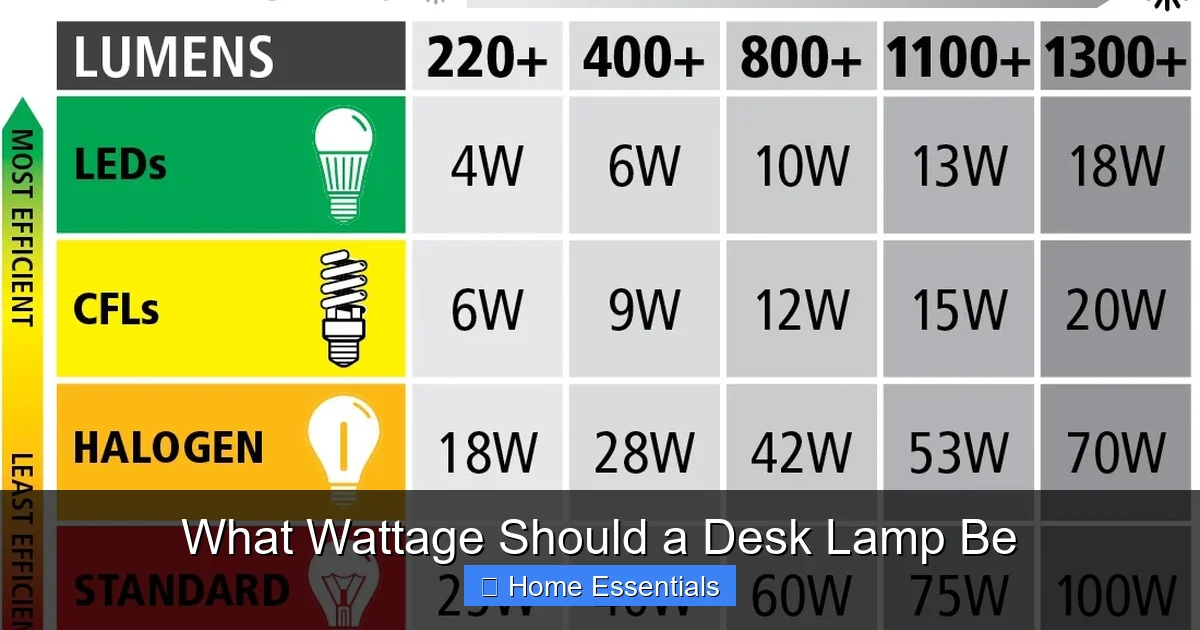
Wattage is a measure of energy consumption, not light output. It tells you how much electricity the bulb uses. An old 60-watt incandescent bulb used 60 watts of power. A modern LED bulb that produces the same amount of light might only use 8-10 watts. So, if you’re shopping for an LED bulb and see “10W,” don’t think “dim.” Think, “This bulb is energy-efficient.” When asking about desk lamp wattage, the question has shifted from “How many watts do I need?” to “What brightness (lumens) do I need, and what wattage will achieve that efficiently?”
Lumens (lm): The Brightness You Actually See
Lumens are the true measure of brightness or light output. This is the number you should focus on. A typical 60W incandescent bulb emits about 800 lumens. A standard 10W LED bulb also emits about 800 lumens. For a desk lamp, general guidance is:
- 300-500 lumens: Soft, ambient light for computer work or casual reading where the primary light source is overhead.
- 500-800 lumens: A good all-around brightness for reading physical books, writing, and general office tasks.
- 800-1100+ lumens: Bright, focused light for detailed work like drafting, electronics repair, jewelry making, or intricate art.
Many desk lamps with integrated LEDs will list their output in lumens directly. If you’re buying a separate bulb, check its lumen rating on the box.
Color Temperature (Kelvin/K): The Mood and Focus Factor
Color temperature describes the “warmth” or “coolness” of white light, measured in Kelvins (K). It dramatically affects how a space feels and how your eyes work.
- 2700K-3000K (Warm White): Similar to old incandescent bulbs. Cozy, relaxing, and easy on the eyes in the evening. Great for ambiance but can feel too yellow for precise, detail-oriented work.
- 3500K-4500K (Neutral/Cool White): A balanced, clean white. Excellent for general office work, reading, and kitchens. It’s alert without being harsh.
- 5000K-6500K (Daylight/Cool Blue): Mimics bright midday sun. Maximizes contrast and alertness, ideal for detailed tasks, art studios, or workshops. Prolonged exposure can feel clinical or glaring if too intense.
For a versatile desk lamp, look for one with a color temperature around 4000K or, even better, one that is tunable (adjustable between warm and cool).
How Bulb Technology Changes the Wattage Question
The type of bulb you use is the bridge between the wattage you see on a switch and the lumens you get on your desk. Let’s compare the main players.
Visual guide about What Wattage Should a Desk Lamp Be
Image source: arlec.co.uk
The Incandescent & Halogen Era (The Old Rule)
If you grew up with traditional bulbs, you remember the rule: 40W for dim, 60W for normal, 100W for bright. Incandescents work by heating a filament, producing light as a byproduct. They are incredibly inefficient—90% of their energy is wasted as heat. Halogens are a more efficient incandescent variant but still run hot and have short lifespans. For a desk lamp, a 40W-60W halogen might provide adequate light, but you’ll feel the heat on your hand, and you’ll change bulbs frequently. Their wattage is a direct, linear indicator of brightness, but at a high energy cost.
The LED Revolution (The New Rule)
LEDs (Light Emitting Diodes) are the standard now. They produce light by moving electrons through a semiconductor. They are 80-90% more efficient than incandescents, produce very little heat, and last 15-25 times longer (25,000+ hours). This is why wattage is now a misleading number for brightness. A 10W LED can easily out-brighten a 60W incandescent. When shopping for an LED bulb or lamp, ignore the wattage equivalent (“60W equivalent”) and find the lumen output. For a desk lamp, you’ll typically want an LED bulb in the 6W-12W range to get 500-1000 lumens, depending on your need. The low wattage means you can often use a lamp with a higher-wattage rating (e.g., a socket marked “Max 60W”) safely with a much lower-wattage LED, getting more light for less energy and heat.
Smart Bulbs: The Ultimate Flexibility
Smart bulbs are LED bulbs with built-in wireless tech (Wi-Fi, Bluetooth, Zigbee). They are controlled via an app or voice assistant. Their major advantage for desk lamps is adjustable brightness and color temperature without changing the bulb. You can set a cool, bright 800-lumen scene for morning drafting and a warm, soft 300-lumen scene for evening reading, all from your phone. If you already have a standard desk lamp with a compatible socket (most are E26/E27), you can simply screw in a smart bulb. This is often more cost-effective than buying a new smart lamp. You can learn more about the technology behind these bulbs in our guide on how a smart bulb works.
Factors That Determine Your Ideal Desk Lamp Brightness
So, you know you need ~500-1000 lumens. But that’s a range. To pinpoint the exact need, ask these questions.
Visual guide about What Wattage Should a Desk Lamp Be
Image source: storables.com
What is Your Primary Task?
This is the #1 factor. Different tasks have different lighting needs.
- Computer Work & General Office: The screen provides its own light. You need a lamp that illuminates your keyboard and papers without causing glare on the screen. A lower brightness (300-500 lumens) with a neutral color temperature (3500K-4100K) placed to the side of your monitor (not directly behind) is ideal.
- Reading (Physical Books/Documents): Requires consistent, shadow-free light across the page. 500-700 lumens with a slightly warmer tone (3000K-4000K) is comfortable for long periods. An adjustable arm is key to positioning the light directly over the page.
- Detail-Oriented Hobbies & Crafts: Sewing, model-building, drawing, jewelry-making, electronics. These demand maximum clarity and contrast. Aim for 800-1100+ lumens with a cool white or daylight color temperature (5000K-6500K). Consider a magnifying lamp with built-in light for extreme detail.
- Writing by Hand: Similar to reading but requires even more light to see pen strokes clearly. 600-800 lumens is a safe bet.
Your Age and Eyesight
As we age, our eyes require more light to see clearly. The lens in our eye yellows, and our pupils get smaller, reducing the amount of light reaching the retina. If you’re over 40, you might benefit from a lamp on the brighter end of your task’s range. Someone with perfect vision in their 20s might find 500 lumens plenty for reading, while someone in their 60s may need 700+ for the same comfort. Don’t fight your eyes—give them the light they need.
Your Workspace Environment
Is your room bathed in bright overhead LEDs, or is it a dim corner with one small window? Your desk lamp’s job is to supplement or create the primary light.
- Bright Room: You need less from your lamp, maybe just 300-400 lumens to fill in shadows on your desk surface.
- Dark Room: The lamp is your main source. You’ll need the full 600-1000+ lumens to avoid eye strain from constantly adjusting between a bright desk surface and a dark room.
Also, consider wall and surface colors. Dark walls and furniture absorb light, requiring a brighter lamp. Light colors reflect light, making a space feel brighter with less output.
Desk Layout and Glare Control
The lamp’s position is as important as its brightness. A too-bright bulb in the wrong place is worse than a slightly dim bulb in the right place. The goal is to light your task without creating glare.
- For screen work: Place the lamp to the side of your monitor (left if you’re right-handed, and vice versa) so light falls on your desk, not your screen. A lamp with a wide, diffused shade helps.
- For paper work: Position the lamp so the light source is over your shoulder, shining directly onto the page. An adjustable arm is invaluable here.
- Shade matters: A matte, fabric, or paper shade diffuses light, reducing harsh shadows. A clear glass or metal shade will produce a more direct, focused beam (good for detail work but can cause glare).
If you find yourself squinting or seeing reflections, your lamp is either too bright, the wrong color temperature, or in the wrong position.
How to Choose and Set Up Your Perfect Desk Lamp
Armed with knowledge, let’s go shopping and setting up.

Visual guide about What Wattage Should a Desk Lamp Be
Image source: i.ytimg.com
Step 1: Decide on Integrated LED vs. Bulb-Based
- Integrated LED Lamp: The light source is built-in. You can’t change it. Pros: Often sleek, modern designs; no bulb to replace; consistent performance. Cons: If the LED fails (rare, but possible), you replace the whole lamp. Brightness and color are fixed unless it’s a model with settings. Great for a dedicated, permanent workspace.
- Bulb-Based Lamp: Uses a standard screw-in bulb (E26/E27). Pros: Ultimate flexibility. You can swap bulbs for different brightness/color. If it’s a smart bulb, you get app control. You can replace a failed bulb cheaply. Cons: Slightly bulkier design to accommodate the socket.
For most people, a high-quality bulb-based lamp is the smarter long-term choice. You can start with a standard LED bulb and upgrade to a smart bulb compatible with Alexa or Google later without touching the lamp itself.
Step 2: Look for Key Features
Beyond wattage/lumens, these features make a huge difference:
- Adjustable Arm/Head: Non-negotiable. You must be able to position the light exactly where it’s needed. Look for multiple pivot points.
- Dimmability: If the lamp or bulb is dimmable, you can fine-tune brightness from 10% to 100%. This is crucial for matching light to the time of day and task. Note: If buying a separate dimmable bulb, ensure your lamp’s switch is compatible (some basic on/off switches won’t work with dimmable LEDs).
- Color Temperature Control: A lamp or bulb that lets you shift from warm to cool white is incredibly versatile for a single workspace used for different activities.
- USB Charging Port: A handy bonus to charge your phone or tablet directly from the base.
- Stable Base: A weighted or wide base prevents tipping when you adjust the arm.
Step 3: A Practical “Starter Kit” Recommendation
If you’re overwhelmed, here’s a foolproof combination for a general home office/desk:
- Lamp: A classic, adjustable arm lamp (like an architect-style swing arm lamp) with a standard E26 socket and a matte fabric shade. Look for one rated for at least a 60W equivalent (though you’ll use far less with LED).
- Bulb: A 9W-11W LED bulb rated for 800 lumens (good all-around brightness) with a color temperature of 4000K (neutral white). Ensure it’s labeled “dimmable” if your lamp has a dimmer switch.
This setup costs little, provides excellent light, and is future-proof. If you later want tunable white, just replace the bulb with a smart bulb that works with Google Home or your preferred ecosystem.
Common Mistakes and How to Avoid Them
Even with the right numbers, people often mess up their desk lighting. Here’s how to sidestep the pitfalls.
Mistake 1: Buying the Highest Wattage/Lumen Bulb You Can Find
“More is better” is a trap. A 1500-lumen bulb pointed directly at your desk will create a harsh, spotlight effect. It will cause deep shadows on the opposite side of objects, force your pupils to constantly contract and dilate, and lead to rapid eye fatigue and headaches. Solution: Start with a mid-range bulb (600-800 lumens). If it feels insufficient after a few days, go up by 200-300 lumens. It’s easier to add a second, smaller task light (like a clip-on book light) than to fix an overly bright primary lamp.
Mistake 2: Ignoring Color Temperature
A 5000K bulb in a cozy study at 8 PM will make the room feel like an interrogation chamber and disrupt melatonin production, affecting sleep. Solution: Use warmer light (2700K-3000K) in the evenings. For a single bulb, a 3500K-4000K “neutral white” is the safest all-day compromise. For ultimate control, use a tunable smart bulb that automatically shifts from cool in the day to warm at night.
Mistake 3: Creating Screen Glare
This is the #1 complaint. Placing a bright lamp directly behind you, shining over your shoulder onto a glossy monitor, creates a mirror-like reflection. Solution: Follow the positioning rules above. Use a lamp with a hood or a shade that directs light downward. A matte screen filter can also help. If using a laptop, consider a separate monitor light bar that clips to the top of the screen and lights the desk without hitting the display.
Mistake 4: Using a “Cute” Lamp with Poor Function
That beautiful ceramic vase-shaped lamp might look great, but if its shade is too small, too dark, or non-adjustable, it will fail as a task light. Solution: Prioritize function over form for your primary work lamp. A slightly less stylish lamp with perfect adjustability will serve you infinitely better. You can always add a decorative lamp for ambiance.
Mistake 5: Not Considering Heat (for Non-LEDs)
If you’re still using an incandescent or halogen bulb, high wattage means high heat. A 75W halogen bulb can get hot enough to burn your fingers if touched and can warp plastic lamp parts over time. It also wastes energy. Solution: Switch to LED. It solves the heat problem entirely. For reference on why modern LEDs stay cool, see our article on if smart bulbs should get hot—the principles apply to all LEDs.
The Future is Smart: Beyond Simple Wattage
The question “what wattage” is becoming obsolete. The future of desk lighting is about intelligent, adaptive systems. A smart desk lamp or a smart bulb in a traditional lamp can:
- Automatically adjust brightness based on the time of day or your preset schedule.
- Change color temperature to support your circadian rhythm (cool for focus, warm for relaxation).
- Be controlled by voice (“Alexa, set desk lamp to 75%”) while your hands are full with a project.
- Integrate with routines—turn on at a specific brightness when you start work, dim when a video call begins.
The upfront cost is higher, but the flexibility and potential energy savings (using only the light you need) can be worth it. If you’re tech-savvy and hate manually adjusting switches, this is the ultimate solution. Just ensure your home Wi-Fi is stable, as some smart bulbs require a constant connection. You can also check our guide on if smart bulbs can be hacked for peace of mind on security.
Frequently Asked Questions
What’s the difference between watts and lumens?
Watts measure the electricity a bulb uses (energy cost). Lumens measure the total amount of visible light it emits (brightness). For LEDs, a low wattage can produce high lumens. Always check the lumen rating for brightness.
What is the best wattage (lumens) for reading at a desk?
Aim for a lamp that delivers 500-700 lumens directly onto your reading material. This is bright enough to prevent eye strain without creating harsh shadows or glare on a nearby screen. A color temperature of 3000K-4000K is most comfortable for extended reading.
Can I use a higher wattage LED bulb than my lamp’s socket rating?
Yes, and you should. A socket marked “Max 60W” refers to the old incandescent standard. A 10W LED bulb that produces 800 lumens is perfectly safe and will give you far more light than a 60W incandescent. The wattage rating is about heat and electrical load, not brightness.
Is a higher color temperature (5000K) always better for a desk?
Not necessarily. While 5000K+ “daylight” bulbs maximize alertness and detail for tasks like drafting, they can be glaring and uncomfortable for long periods, especially in the evening. A neutral 4000K is a more versatile, all-day choice. Use cool light in the morning and warm light at night.
Should I buy a smart bulb or a smart lamp for my desk?
For flexibility and cost, buy a standard, adjustable bulb-based lamp and add a dimmable, tunable smart bulb. This lets you upgrade your lighting with software features without replacing the entire fixture. Ensure the lamp’s switch is compatible with dimmable LEDs if you go this route.
My desk lamp is too bright even on its lowest setting. What can I do?
If the integrated LED isn’t dimmable, your options are limited. You could try a neutral density filter (like a thin parchment paper) over the LED to diffuse it, but this isn’t ideal. The best fix is to replace the lamp with a dimmable model or use a smart bulb in a new lamp that offers finer brightness control down to 1% or 5%.