Where Should Desk Be in Office
The placement of your desk in the office is a foundational element that directly influences your daily productivity, concentration, and physical health. Key considerations include harnessing natural light without glare, positioning away from high-traffic distractions, and aligning your setup for optimal ergonomic posture. Taking the time to strategically position your desk is one of the most effective, low-cost upgrades you can make to your workspace.
Key Takeaways
- Face a wall or window, not the door: Positioning your desk to face a solid wall or a window (with light coming from the side) minimizes visual distractions and creates a sense of psychological security.
- Prioritize indirect, natural light: Place your desk so natural light comes from the side or front, never directly behind your monitor, to avoid glare and eye strain.
- Identify and avoid high-traffic zones: Keep your desk away from primary walkways, doorways, and shared spaces to maintain focus and reduce interruptions.
- Ergonomics dictate precise measurements: Ensure your desk height allows for 90-degree elbow bends, and your monitor is an arm’s length away with the top at or slightly below eye level.
- Store essentials within the “golden ellipse”: Keep frequently used items like your keyboard, mouse, notebooks, and a microfiber cloth for screen cleaning within the easy-reach zone directly in front of you.
- Personalize to motivate, not clutter: Add a plant, art, or personal items to boost mood, but keep the desk surface clear to maintain mental clarity and physical space.
- Consider room layout and power sources: Plan your desk location around existing outlets to avoid tripping hazards and ensure your entire setup—monitor, laptop, lamp—has reliable power without extension cords snaking across the floor.
📑 Table of Contents
- The Power of Position: Why Your Desk’s Location Matters
- Lighting: The Non-Negotiable Factor
- Traffic Flow and Distraction Management
- Ergonomic Essentials: It’s Not Just About the Chair
- Storage and Accessibility: A Place for Everything
- Personalizing and Psychological Positioning
- Conclusion: Experiment and Optimize
The Power of Position: Why Your Desk’s Location Matters
Have you ever felt oddly restless at your desk, or struggled to focus no matter how hard you tried? Before you blame your workload or your willpower, take a look around. The answer might be as simple—and as profound—as the physical placement of your desk within the room. The question of where should desk be in office isn’t about interior design trends; it’s about environmental psychology, ergonomic science, and the subtle, constant signals our surroundings send to our brains. Your desk’s position sets the stage for your entire workday, influencing everything from your posture and eye comfort to your stress levels and creative flow.
Think of your office as an ecosystem, and your desk is the central hub. Its orientation to light, foot traffic, and walls creates a micro-environment. A poorly placed desk can lead to chronic glare, persistent interruptions, and a subconscious feeling of exposure or confinement. Conversely, a thoughtfully positioned desk becomes an engine of efficiency, a command center that supports your body’s needs and shields your mind from unnecessary noise—both literal and figurative. Getting this right is the first, most critical step in building a workspace that truly works for you.
Lighting: The Non-Negotiable Factor
Lighting is the single most impactful environmental factor on your visual comfort and energy levels. The wrong lighting causes headaches, eye fatigue, and squinting, which compounds stress and drains your focus. The goal is to leverage the best free source—daylight—while masterfully managing its potential pitfalls, and then supplementing with smart artificial light.
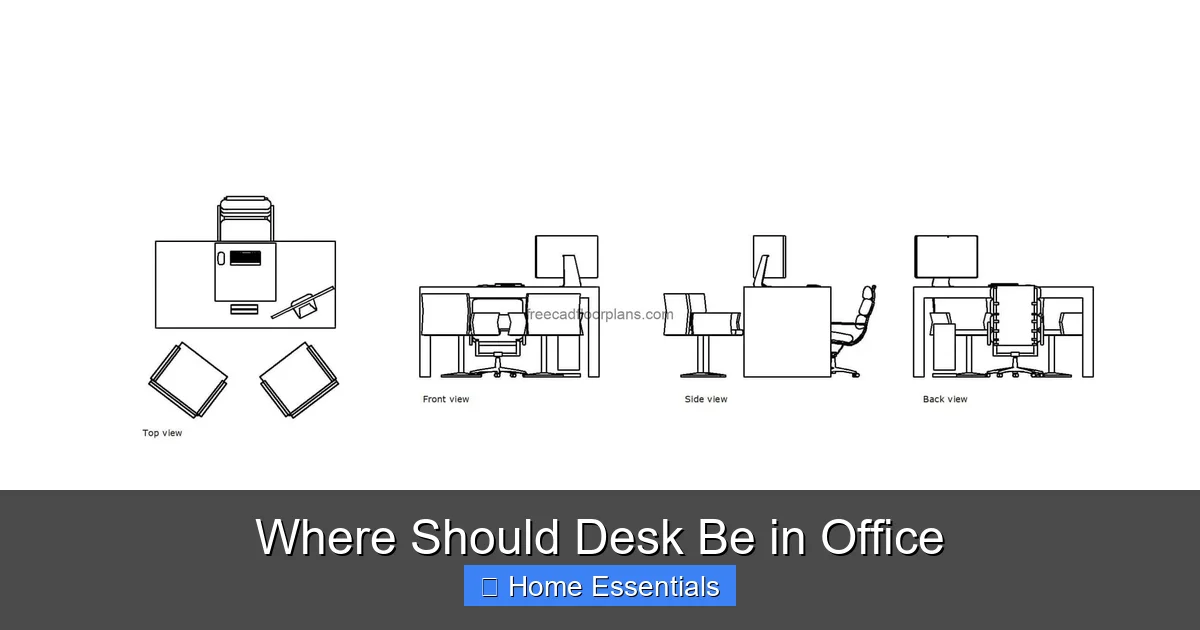
Visual guide about Where Should Desk Be in Office
Image source: freecadfloorplans.com
Natural Light: Your Greatest Ally (If Positioned Correctly)
The benefits of natural light are well-documented: it boosts mood, regulates circadian rhythms, and reduces the need for harsh artificial lighting. However, the classic mistake is placing your desk facing a window. This positions the bright window directly behind your computer screen, turning your monitor into a reflective mirror. You’ll spend the day squinting at your own reflection or the outside world. The ideal natural light setup is to have light coming from the side (either left or right, depending on your dominant eye and hand) or from in front of you, illuminating your keyboard and papers without hitting the screen head-on. If your only window is directly behind where you want to sit, you must use blinds strategically or plan for robust artificial lighting to counteract the glare.
Artificial Lighting: Quality and Control Are Key
On cloudy days, early evenings, or in windowless rooms, artificial lighting takes over. Here, the quality of light matters immensely. Harsh, overhead fluorescent lights can feel institutional and draining. The solution is layered lighting: a combination of ambient light (a central ceiling fixture), task lighting (a dedicated desk lamp), and accent lighting. For your task light, choose a lamp with a flexible neck that you can position to fill in shadows without creating new glare on your screen. The color temperature is also crucial; cooler, blue-toned light (5000K-6500K) promotes alertness for analytical tasks, while warmer, yellow-toned light (2700K-3000K) is better for winding down or creative thinking. Modern smart bulbs offer the ultimate flexibility, allowing you to adjust both brightness and color temperature throughout the day with an app or voice command. You can have energizing cool light in the morning and soothing warm light in the afternoon, perfectly mimicking the sun’s natural cycle. Understanding how to control these aspects, such as how to properly dim smart bulbs, is essential for creating a dynamic, eye-friendly environment.
Furthermore, the ability to control lights remotely is a huge advantage for productivity. Imagine adjusting your lamp’s brightness without leaving your chair, or setting a “focus mode” that dims all non-essential lights. This level of control, explored in guides on remote smart bulb management, eliminates a physical distraction and keeps you in the flow state. Just be sure any smart bulb you use is compatible with your existing fixtures; you can find more on that topic here.
Traffic Flow and Distraction Management
Your desk’s position either creates a fortress of focus or a crossroads of chaos. The path people naturally take through a room is a powerful, often overlooked force. Placing your desk in a primary walkway—between the door and the main seating area, or in a hallway connecting two rooms—is a recipe for constant micro-interruptions. Every passing colleague, family member, or pet becomes a distraction, forcing your brain to repeatedly disengage and re-engage from deep work, a process that saps significant mental energy.
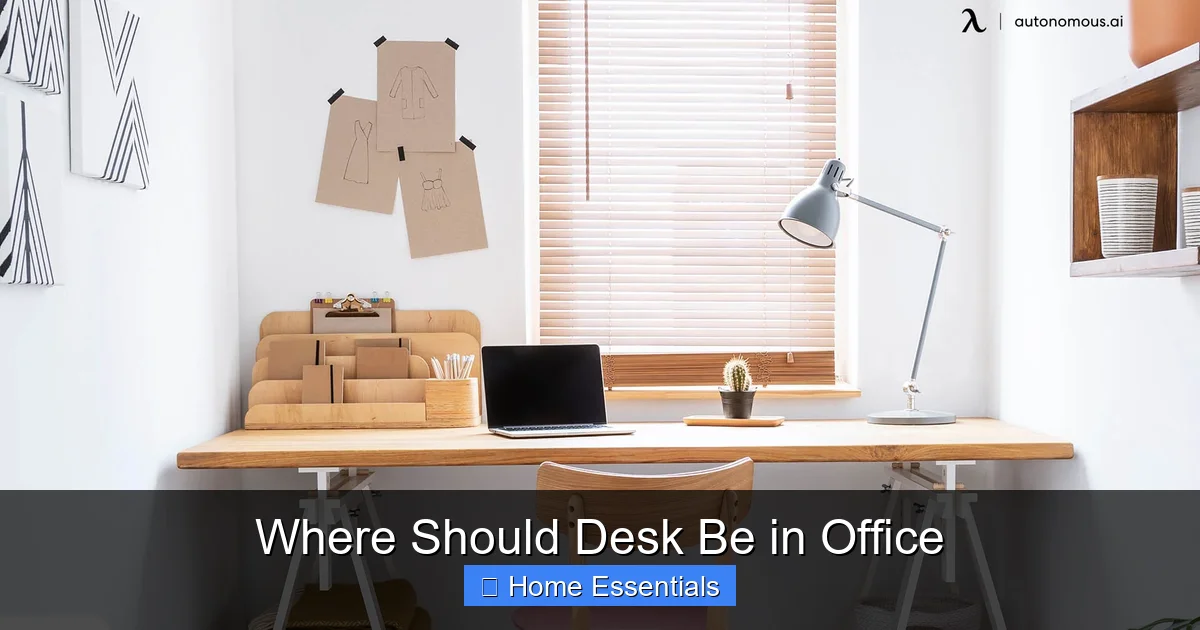
Visual guide about Where Should Desk Be in Office
Image source: cdn.autonomous.ai
Identifying High-Traffic Zones
Before you set up, simply observe the natural movement in your office for a day. Where do feet tend to tread? The most common high-traffic zones are:
- Directly in line with the main door: This creates a “sightline” issue where anyone entering immediately makes eye contact with you, and vice versa.
- In the center of the room’s “desire path” (the shortest, most intuitive route between two points).
- Next to a doorway to another room, like a bedroom or closet.
- Between a seating area (like a sofa) and a bookshelf or other focal point.
Avoid these areas. Your goal is to place your desk where movement happens around you, not through your workspace.
Creating a Psychological and Physical Barrier
Even in an open-plan home office, you can create a sense of separation. Positioning your desk so your chair has its back to a solid wall or a tall, sturdy bookshelf creates a “backed” position that feels secure and reduces the need to constantly monitor your surroundings. If you must face into the room, use a room divider, a large plant, or a console table behind your monitor to break the direct line of sight from the door. This subtle barrier signals to others that you are in “work mode” and helps your own brain switch into concentration mode. In shared spaces, communicating your “do not disturb” signals (like a specific lamp being on) can also help manage traffic.
Ergonomic Essentials: It’s Not Just About the Chair
Ergonomics is often reduced to chair height, but your desk’s location is intrinsically linked to a full-body ergonomic setup. A perfect chair is useless if your desk forces you into a twisted posture to see the screen or reach for supplies.
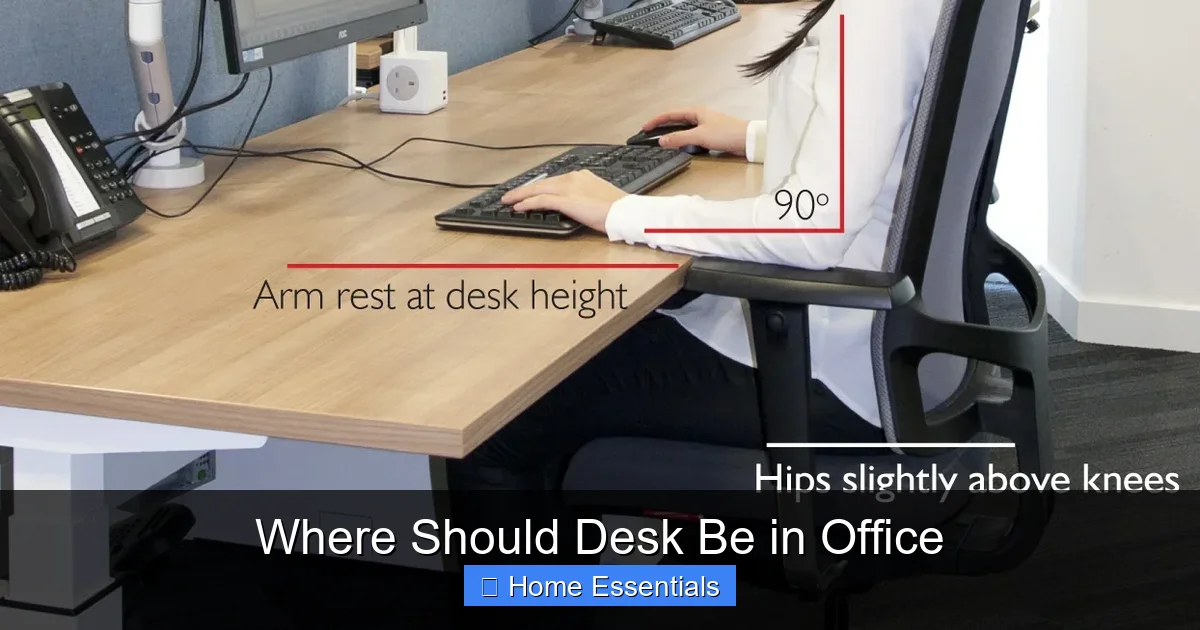
Visual guide about Where Should Desk Be in Office
Image source: deskadvisor.org
The “Golden Triangle” of Reach
Imagine a semi-circle with a radius of about 15-20 inches extending from your body in front of you. This is your primary “golden ellipse” of movement. Your keyboard and mouse must sit comfortably within this zone. Your most frequently used items—current notebook, pen cup, phone—should also be here. If your desk is too deep, you’ll be constantly stretching, straining your shoulders and back. If it’s too shallow, you’ll be hunching forward. The ideal desk depth allows your monitor to be at least an arm’s length away (about 20-30 inches) while keeping your keyboard and mouse within that comfortable reach zone. Your desk’s location must allow for this depth without bumping into walls or other furniture.
Monitor Placement: The Eye-Level Rule
This is non-negotiable for preventing “tech neck.” The top third of your monitor screen should be at or slightly below your natural eye line when you’re sitting up straight with your head level. This means your gaze should land naturally on the upper portion of the screen. If your desk is too high or too low, you’ll either look down (straining your neck and upper back) or look up (straining your neck and causing jaw tension). Your desk height must work in concert with your chair height to achieve this. For laptop users, this almost always means using a separate keyboard and mouse and propping the laptop up on a stand so the screen is at the correct height. The location of your desk must also consider the light source to prevent glare on this correctly positioned screen.
Storage and Accessibility: A Place for Everything
Clutter is the enemy of focus. A big part of defeating it is having storage solutions that are logically placed relative to your desk’s position. The goal is to have everything you need within easy reach, but not so close that it encroaches on your primary work surface.
Within Arm’s Reach, Not On Top
Use vertical space! Wall-mounted shelves, a tall narrow bookcase beside your desk, or a filing cabinet on casters can hold reference materials, supplies, and archives. The items you use daily (current project files, planner, headphones) can live on the desk surface or in a shallow under-desk drawer. Items used weekly or monthly belong on the shelves within a stand-up reach. This keeps your immediate desktop clear, which is crucial for mental clarity. A clean surface signals a clear mind. Keep a supply of microfiber cloths nearby for quick screen and glasses cleaning—they’re superior to paper towels and can be reused. Knowing where to store microfiber cloths properly (in a dry, clean pouch or drawer) ensures they’re always ready and effective, preventing dust and smudges from becoming visual distractions.
Cable Management: The Invisible Trip Hazard
Where your desk sits determines your cable routing nightmare or dream. A desk placed against a wall with a single power outlet is ideal. You can use a short power strip and cable clips to run all cords neatly down the back of the desk and into a single conduit or cover. A desk in the middle of the room or far from an outlet leads to long, unsightly, and unsafe extension cords snaking across the floor. When planning your desk location, count your devices (monitor, computer, lamp, phone charger, perhaps a printer) and locate the nearest outlet. The path to that outlet should be as direct and hidden as possible. This isn’t just aesthetics; it’s a safety and tripping hazard issue.
Personalizing and Psychological Positioning
Your desk’s location sets the stage, but the decor and personal items you bring in determine the mood. This is where you tailor the space to support your specific type of work and personality.
The “Command Position” vs. The “Collaborative Position”
Traditionally, the best position is with your back to a solid wall and a clear view of the door—the “command position.” This subconsciously reduces anxiety about who is behind you and gives you a sense of control. However, if your work involves frequent video calls, you may prefer to face a pleasing, neutral background rather than a wall. In this case, position your desk so your camera faces a tidy bookshelf or a wall with subtle art, with your back to a solid, non-distracting wall. For creative or collaborative work, a desk that faces into the room or even a window can foster open thinking and make the space feel more inviting for impromptu meetings.
Nature, Art, and Motivation
Within your line of sight (ideally on the wall opposite or to the side of your monitor), place something that inspires you. This could be a piece of art that makes you happy, a vision board, a framed quote, or a low-maintenance plant like a snake plant or pothos. Studies show that even a glimpse of greenery reduces stress and boosts creativity. Avoid placing anything too visually busy or emotionally charged directly in your primary sightline, as it can become a distraction. The goal is subtle, positive reinforcement. Also, consider the practical side: ensure any decor doesn’t create a new source of glare on your screen at different times of day.
Conclusion: Experiment and Optimize
There is no single, universal “perfect” spot for every desk in every office. The ideal position is a formula that balances your unique room’s constraints with the immutable laws of lighting, ergonomics, and psychology. Start by respecting the non-negotiables: side or front-facing natural light, no direct screen glare, distance from high-traffic paths, and a solid wall or barrier behind you. Then, use the principles of the golden triangle of reach and eye-level monitoring to fine-tune your desk height and depth. Finally, personalize the space to make it feel like yours, and commit to keeping it organized with smart storage solutions.
Don’t be afraid to experiment. Try your desk in one corner for a week, then move it to another wall. Note how your energy, focus, and physical comfort change. The process of asking “where should desk be in office” is ultimately the process of designing a workspace that actively supports your best work, your health, and your peace of mind. It’s one of the most important investments you can make in your daily productivity and long-term well-being.
Frequently Asked Questions
Should my desk face the window or the wall?
Generally, your desk should face a wall or a room’s interior, not the window. This prevents the window’s bright light from creating a glare on your screen behind you. The ideal is to have the window to your side, so light illuminates your workspace without hitting the monitor directly.
What is the best desk position in a small office?
In a small room, place your desk on the shortest wall, often the one opposite the door, to maximize open floor space. This also allows you to see the door without turning, which can feel more secure. Ensure it’s not blocking a closet or cabinet door when open.
Is it bad to have my back to the door?
For many, having their back to the door creates subconscious anxiety and the need to constantly glance over their shoulder, reducing focus. If possible, position your desk so you can see the door in your peripheral vision, or use a mirror to see the entrance behind you.
How far from the wall should my desk be?
Your desk should be close enough to the wall to allow cable management and prevent you from leaning back and hitting it, but far enough to comfortably pull out your chair and stand up. Typically, 24-30 inches from the wall to the desk back edge is sufficient for most people.
Where should I put my desk in a shared or open-plan space?
In a shared space, prioritize creating a visual and physical barrier. Place your desk against a solid partition or use a tall plant/bookshelf to define your zone. Avoid high-traffic aisles and position your chair so your back is to a wall or solid surface for a sense of security.
Does desk material affect its ideal position?
Not significantly, but consider reflectivity. A highly glossy desk surface can bounce light onto your screen from overhead lights or windows. A matte finish is generally better for reducing glare, regardless of where the desk is placed. The position relative to light sources remains the primary concern.