Why Does My Desk Lamp Flicker
A flickering desk lamp is a common but often fixable issue, typically caused by loose connections, incompatible dimmers, or failing components. While sometimes a simple bulb swap solves it, persistent flicker can indicate deeper electrical problems needing professional attention. Addressing it promptly ensures eye comfort, safety, and consistent illumination for your workspace.
You’re deep in work, fingers flying across the keyboard, when your trusty desk lamp catches your eye. Instead of a steady, comforting glow, it’s pulsing. A slow, rhythmic dimming and brightening. Or maybe it’s a chaotic strobe, like a tiny, annoying disco in the corner of your office. You might give the base a tap, and it steadies for a minute before starting again. It’s more than just a minor annoyance—that flickering light can cause eye strain, headaches, and a creeping sense of unease. But what’s actually happening inside that little lamp? Why does your desk lamp flicker, and more importantly, how do you make it stop? Let’s shed some light on this common household mystery.
First, don’t panic. While a flickering light can be a symptom of a serious electrical issue, it’s often something simple and safe you can fix yourself in five minutes. The key is understanding the pattern of the flicker and knowing what to look for. We’ll walk through everything from the simplest screw-tightening fix to the signs that mean it’s time to call a professional. By the end, you’ll be equipped to diagnose and solve the problem, restoring steady, reliable light to your workspace.
Key Takeaways
- Loose connections are the #1 culprit: Often, simply tightening the bulb or checking the socket resolves the issue.
- Dimmer switch incompatibility is a major cause for LEDs: Using a modern LED bulb on an old magnetic dimmer will almost always cause flicker.
- Flicker can signal hazardous wiring problems: Persistent, low-frequency flicker may point to loose wiring in the lamp or your home’s circuit, requiring an electrician.
- Not all flicker is visible: Some high-frequency flicker is invisible but can still cause eye strain and headaches over time.
- The fix depends on the lamp type: Solutions for a simple incandescent lamp differ from those for an LED or smart bulb-based lamp.
- Voltage fluctuations in your home are a systemic issue: If multiple lights flicker when large appliances kick on, the problem is with your home’s electrical supply, not the lamp itself.
📑 Table of Contents
- What Is Light Flicker, and Why Should You Care?
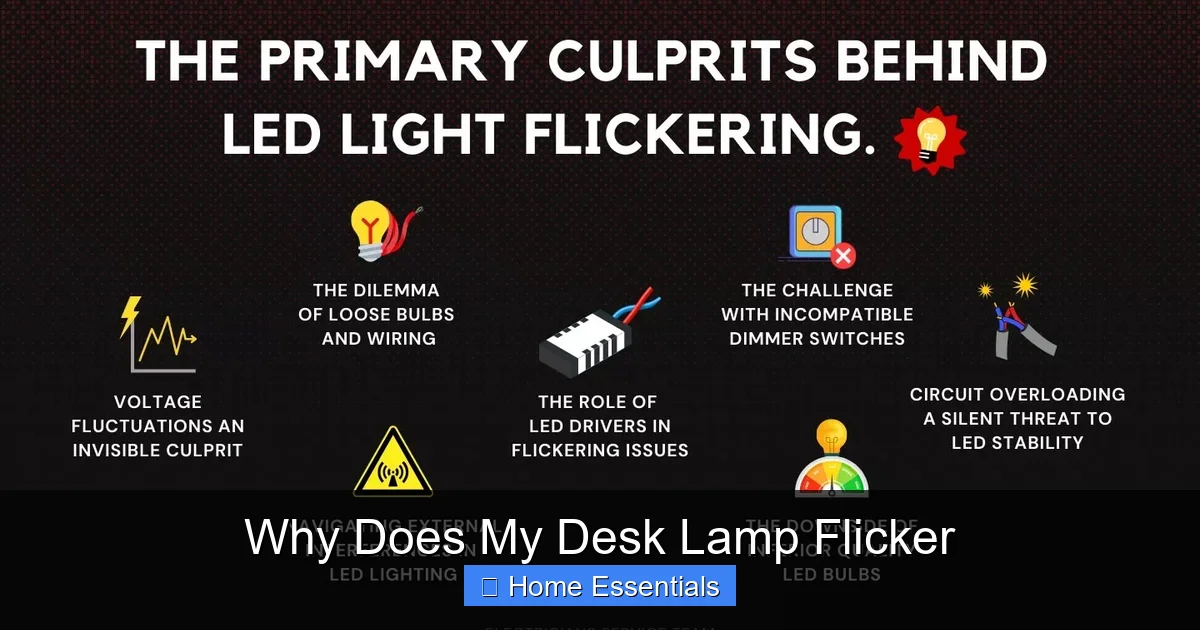
- The Usual Suspects: Top 6 Reasons Your Desk Lamp Flickers
- How to Diagnose the Flicker Pattern: Your First Steps
- Step-by-Step Fixes for Common Flicker Issues
- When to Call an Electrician: The Non-Negotiables
- Preventing Future Flicker: Smart Buying and Maintenance
- Conclusion
What Is Light Flicker, and Why Should You Care?
Before we dive into causes, let’s define our terms. Light flicker is any rapid, repeated change in a lamp’s brightness. It can be so fast you don’t consciously see it (called invisible or high-frequency flicker) or a slow, obvious pulse (low-frequency flicker). Both types can have consequences.
Visible vs. Invisible Flicker
Visible flicker is what most people notice—the obvious dimming and brightening. It’s typically below 100 cycles per second (Hertz or Hz) and is often caused by issues with the power supply to the bulb itself. Invisible flicker occurs at rates higher than 100 Hz. Your eyes and brain can’t process the individual pulses, but your visual system still detects the modulation. This type is notorious for causing subtle but real symptoms like eye fatigue, headaches, difficulty concentrating, and a general feeling of malaise after working under it for a while. Many older or poorly designed LED fixtures and drivers produce invisible flicker.
Health and Comfort Implications
Our brains and eyes are wired to expect steady light from the sun or a good incandescent bulb. Rapid fluctuations force our visual system to constantly adjust, which we experience as strain. For people with photosensitive epilepsy, certain flicker patterns can be a trigger, though this is rare with typical desk lamps. For the rest of us, it’s mostly about comfort and productivity. A steady light is simply less tiring. So, even if the flicker seems minor, fixing it can improve your daily work experience significantly.
The Usual Suspects: Top 6 Reasons Your Desk Lamp Flickers
Now, let’s play detective. The cause of your flickering lamp usually falls into one of a few categories. We’ll start with the simplest and most common.
Visual guide about Why Does My Desk Lamp Flicker
Image source: i.ytimg.com
1. Loose or Faulty Bulb Connection
This is the first thing you should check, and it’s the easiest fix. Over time, as you move the lamp or simply from thermal expansion and contraction, the light bulb can become slightly loose in its socket. This creates an intermittent electrical contact. The bulb’s filament or LED base doesn’t get a consistent flow of power, causing it to dim and brighten as the connection wavers.
What to do: Turn off the lamp at the switch, unplug it from the wall, and let the bulb cool if it was on. Gently but firmly screw the bulb clockwise into the socket until it’s snug. Don’t overtighten, especially with glass bulbs. If the bulb is a bayonet mount (like many car bulbs), push it in and twist. If the lamp has a translucent cover, remove it to check the socket itself for any signs of corrosion or damage. Sometimes, the metal tab at the bottom of the socket can get flattened. With the power off, you can gently pry it up slightly with a insulated tool to ensure it makes good contact with the bulb’s base.
2. Incompatible or Faulty Dimmer Switch
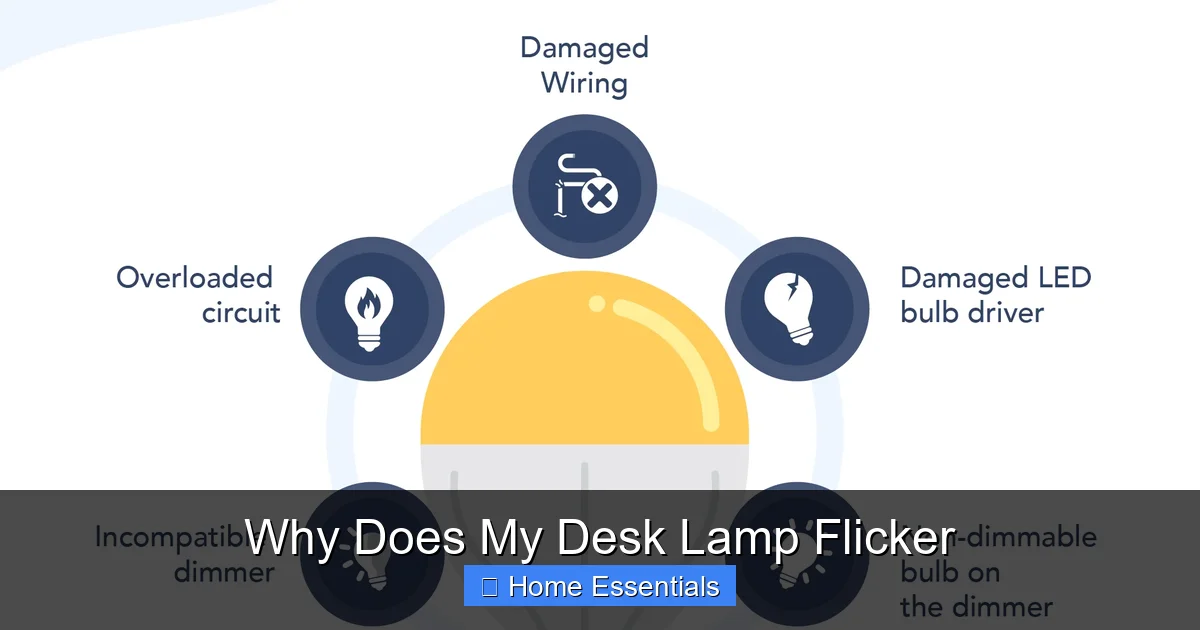
This is the most common cause of flicker in modern LED desk lamps. Traditional dimmer switches were designed for high-wattage incandescent bulbs, which work by reducing the voltage sent to a resistive filament. LEDs, however, are low-voltage electronic devices that require a constant, smooth current. An old-style dimmer “chops” the AC power wave, which LEDs and their internal drivers can’t handle smoothly, resulting in flicker, buzzing, or a reduced dimming range.
Even if your lamp has a built-in dimmer (a common feature on many modern LED desk lamps), the internal dimming circuitry or the LED driver can fail or be poorly designed, causing flicker at certain brightness levels.
- Compatibility is key: If you’ve recently replaced the bulb in your lamp with an LED, and it now flickers when you use the dimmer, the bulb and dimmer are likely incompatible. You need a bulb specifically labeled as “dimmable” and compatible with your type of dimmer (leading-edge/trailing-edge).
- The smart bulb complication: If your desk lamp uses a smart bulb (like Wi-Fi or Zigbee bulbs), flickering when dimmed via the app or a physical dimmer can be even more complex. Smart bulbs have their own internal software and driver, and they often require a specific, compatible dimmer switch or must be dimmed only through their app. Forcing a smart bulb onto an incompatible wall dimmer is a classic cause of flicker. If this sounds familiar, you should review your smart bulb’s compatibility guide. Issues with smart bulb responsiveness and flickering are deeply interconnected, often stemming from the same power delivery problems.
3. Aging or Faulty Fluorescent Ballast
If your desk lamp is an older model with a fluorescent tube (those long, skinny bulbs), the flicker is likely due to the ballast. The ballast is the magnetic or electronic component that regulates the current to the gas-filled tube. Traditional magnetic ballasts operate at a low frequency (60 Hz) and can cause a noticeable, low-frequency flicker and hum as they cycle the power on and off to maintain the arc. They also take a moment to “warm up” the gas, which is why old fluorescent lights sometimes flicker or glow dimly before becoming fully bright.
What to do: If the lamp is old, the ballast may simply be failing. Symptoms include flickering, buzzing, a pinkish glow at the ends of the tube, or the lamp taking a long time to start. Replacing the ballast is possible but often not cost-effective for a desk lamp. The simpler and more energy-efficient solution is to replace the entire fluorescent lamp with an LED retrofit tube. However, be cautious: some older fluorescent fixtures with magnetic ballasts require the ballast to be bypassed for an LED tube to work properly and not flicker. This is a minor electrical job.
4. Voltage Fluctuations in Your Home’s Circuit
This is a broader electrical issue. The voltage coming from your wall outlet should be a steady 120V (in North America) or 230V (in many other regions). But when large appliances like an air conditioner, refrigerator compressor, or microwave turn on, they create a sudden, massive draw on the circuit. This can cause a brief “voltage sag,” where the voltage available to other devices on the same circuit—like your desk lamp—drops momentarily. The lamp will dim noticeably in sync with the appliance cycling on.
How to check: Do other lights in the same room or on the same circuit dim at the same time? Does the flicker happen only when your HVAC system kicks on? If yes, the problem is with your home’s electrical load, not the lamp itself. This is usually more of an inconvenience than a danger, but chronic voltage sags can stress other electronics. The solution is to have an electrician evaluate your home’s electrical panel and potentially move the lamp’s plug to a circuit on a different breaker that’s less burdened by large appliances.
5. LED Driver Issues
Every LED bulb or fixture has a small internal circuit board called a driver. Its job is to convert the high-voltage AC power from your wall into the low-voltage, constant DC current that LEDs need. A failing or low-quality driver is a prime source of flicker. The driver’s capacitors can degrade over time, especially if the lamp is in a hot environment, leading to an inconsistent output. This often manifests as a subtle, high-frequency flicker that you might not see directly but feel as eye strain.
What it means: If the bulb itself is new but flickers, it might be a defective unit. If an older LED bulb starts flickering, the driver is likely at the end of its life. Unlike incandescents, LEDs don’t usually “burn out” with a filament break; they gradually lose brightness and become unstable. The fix is to replace the bulb. For integrated LED desk lamps (where the LEDs are built-in and not replaceable), a faulty driver means the entire lamp may need repair or replacement.
6. Loose Wiring or Socket Problems
This is the most serious cause on our list and requires caution. Flickering can be caused by a loose wire connection anywhere in the circuit—inside the lamp’s cord, at the plug, in the wall outlet, or even in the junction box behind the wall. A loose connection creates high resistance, which causes arcing (tiny, hidden sparks) and voltage drops at the connection point. This arcing generates heat and is a major fire hazard. The flickering might be random or get worse when you jiggle the cord or plug.
Warning signs: If you notice the plug or outlet is warm to the touch, if you see scorch marks or smell ozone (a sharp, metallic smell), or if the flickering is accompanied by crackling sounds, stop using the lamp immediately. Do not attempt to fix internal wiring yourself unless you are a qualified electrician. Unplug the lamp and call a pro to inspect your home’s wiring and outlets.
How to Diagnose the Flicker Pattern: Your First Steps
Before you start unscrewing things, play observer. The behavior of the flicker is your biggest clue. Here’s a simple diagnostic guide.
Visual guide about Why Does My Desk Lamp Flicker
Image source: i.stack.imgur.com
Steady vs. Intermittent Flicker
A steady, rhythmic pulse (e.g., dim-bright-dim-bright every few seconds) often points to a failing component like a ballast or driver, or a specific incompatibility with a dimmer set at a particular level. An intermittent, random flicker that seems to happen without pattern is more likely a loose connection—a bulb that’s not tight, a loose wire in the cord, or a failing plug.
Flicker on Startup
If the lamp flickers, glows dimly, or strobes for a few seconds when you first turn it on before becoming steady, this is classic behavior for a few things:
- An old fluorescent lamp and ballast warming up.
- A failing LED driver that needs a moment to stabilize.
- A smart bulb going through its power-on self-check and connection routine to your hub or Wi-Fi network.
If this startup flicker lasts more than 2-3 seconds, it’s a sign of a weak or failing component.
Random Pulsing or Dimming with Appliance Use
As mentioned, if the lamp dims in sync with your refrigerator kicking on, you’ve identified a voltage sag issue. If the pulsing is completely random and not tied to any other appliance, you’re likely looking at an internal loose connection or a failing bulb/driver.
Step-by-Step Fixes for Common Flicker Issues
Armed with your observations, let’s apply some solutions, starting with the safest and easiest.
Visual guide about Why Does My Desk Lamp Flicker
Image source: ledlightinginfo.com
Step 1: The Bulb and Socket Check
This is your mandatory first step, always. Unplug the lamp. Firmly re-seat the bulb. If it’s a screw-in bulb, make sure it’s not cross-threaded. Inspect the socket. If it’s corroded or damaged, you may need to replace the entire socket, which is a simple electrical project. If the lamp is old and the cord feels brittle or damaged at the entry point to the lamp base, that’s a red flag for internal wiring issues. Replace the cord or the lamp.
Step 2: The Dimmer and Bulb Compatibility Audit
If your lamp has a dimmer switch (either on the cord or the base) and you’re using an LED bulb:
- Check the bulb packaging: Does it say “dimmable”? Does it list compatible dimmer types (e.g., “compatible with leading-edge dimmers”)?
- Check your dimmer type: If it’s an old, rotary-style dimmer, it’s almost certainly a magnetic (leading-edge) dimmer. Many modern LEDs require electronic (trailing-edge) dimmers. You may need to replace the dimmer switch. This is a job for an electrician if it’s a wall switch.
- Test with a non-dimmable LED or incandescent bulb: If the flicker stops with a standard non-dimmable LED (which will just be on/off at full brightness), you’ve confirmed the dimmer is the problem. If you’re using a smart bulb, consult its manual. Most smart bulbs should not be used with a traditional dimmer switch at all, as it can damage both the bulb and the dimmer. They must be controlled via their app or a compatible smart switch.
- Update smart bulb firmware: For smart bulbs, sometimes flickering issues are resolved by a firmware update through the companion app.
Understanding how a smart bulb works can clarify why they have such specific power requirements and why a standard dimmer is often incompatible.
Step 3: Isolate the Problem: Lamp vs. Outlet vs. Circuit
Unplug your desk lamp and plug a different, known-good lamp (like a simple table lamp with an incandescent bulb) into the same outlet. Does the new lamp flicker? If yes, the problem is with the outlet or the circuit. If no, the problem is with your original desk lamp.
Next, plug your original desk lamp into a different outlet on a different circuit (e.g., in another room). Does it still flicker? If it works steadily in the new outlet, the original outlet or its wiring is suspect. If it still flickers, the lamp itself is the culprit.
Step 4: Replace the Bulb
This is the ultimate test for LED and fluorescent lamps. If you’ve checked the connection and compatibility, simply install a brand-new, high-quality bulb of the same type. If the new bulb works perfectly, your old bulb was at the end of its life. If the new bulb also flickers, the problem is in the lamp’s socket, cord, or internal driver.
When to Call an Electrician: The Non-Negotiables
Your safety is paramount. Here are clear signs that this is a job for a licensed professional:
- Warmth, scorch marks, or burning smells: From the plug, outlet, or lamp cord. This indicates dangerous arcing.
- Flickering accompanied by buzzing or crackling sounds.
- The lamp works on one circuit but not another, and other lights on the original circuit also flicker. This suggests a problem with the home’s wiring or panel.
- You’ve diagnosed a loose connection inside the lamp’s cord or plug. Replacing a lamp cord is straightforward but must be done correctly. If you’re not comfortable, hire someone.
- You suspect the wall outlet itself is faulty. Outlets can loosen internally over decades of use.
An electrician can safely test for voltage stability, check all connections, and ensure your home’s wiring is up to code. Remember, problems like a smart bulb becoming unresponsive can sometimes be linked to broader electrical supply issues that an electrician can diagnose.
Preventing Future Flicker: Smart Buying and Maintenance
Once you’ve solved the immediate problem, here’s how to prevent it from coming back.
- Buy quality bulbs and lamps: Cheap LEDs often have poorly designed drivers that flicker. Buy bulbs from reputable brands that are UL-listed and explicitly state they are “flicker-free” or meet IEEE 1789 standards for low-risk flicker.
- Match your tech: If you have a dimmer, ensure every bulb you use is rated for that specific dimmer type. For smart bulbs, follow the manufacturer’s guidelines strictly regarding dimmer switches.
- Secure connections: Periodically check that bulbs are snug, especially if the lamp is moved often.
- Don’t overload circuits: Be mindful of what else is plugged into the same circuit as your home office. A space heater and a computer on the same circuit can cause voltage sags.
- Consider the source: If you live in an older home with original wiring, periodic inspection by an electrician is a wise investment for overall safety, not just for your lamp.
Conclusion
That persistent flicker from your desk lamp is your home’s way of sending a signal. Most often, it’s a simple, fixable message: “Hey, I need a tighter bulb!” or “This new bulb and my old dimmer aren’t speaking the same language.” By systematically checking the bulb, the connection, and the dimmer compatibility, you’ll solve the vast majority of cases. Always start with the power off and the bulb cool. However, never ignore the more serious warnings—warmth, smells, or sounds—as they point to hazardous wiring that requires a professional electrician. A steady, reliable light isn’t just about comfort; it’s a small but essential part of a safe and productive home environment. Now, go troubleshoot and get back to work in peace.
Frequently Asked Questions
Is a flickering desk lamp dangerous?
Not always. A loose bulb is harmless. But if the flicker is accompanied by warmth, buzzing, or a burning smell from the plug, outlet, or cord, it indicates dangerous arcing and is a fire risk. In that case, unplug immediately and call an electrician.
Why does my new LED bulb flicker on an old dimmer?
Old magnetic dimmers were designed for incandescent bulbs and work by “chopping” the AC power wave. Modern LED bulbs and their drivers require a smooth, continuous current and are incompatible with this method, causing flicker. You need a bulb labeled for your dimmer type or a new compatible electronic dimmer.
Can a flickering lamp damage my eyes?
Visible flicker is annoying and can cause eye strain and headaches. More concerning is invisible, high-frequency flicker from poor-quality LEDs, which studies show can also lead to visual discomfort and fatigue over time, even if you don’t consciously see it.
Why does my lamp flicker when I turn on my microwave?
This indicates a voltage sag on your home’s electrical circuit. The microwave draws a huge surge of power when it starts, temporarily lowering the voltage available to other devices on the same circuit, like your lamp. It’s usually an inconvenience, not a danger, but an electrician can assess if your panel needs upgrading or circuits need rebalancing.
My fluorescent desk lamp flickers and takes forever to start. What should I do?
These are classic signs of an aging magnetic ballast. The most practical solution is to replace the entire fluorescent lamp with an LED retrofit tube. You must ensure the LED tube is compatible with your fixture—some require bypassing the old ballast, which is a simple electrical task.
I tightened the bulb and it still flickers. Now what?
Next, try a brand-new, high-quality bulb of the same type. If that doesn’t work, try the lamp in a different outlet on a different circuit. If it works elsewhere, the original outlet or its wiring is the problem and needs an electrician. If it still flickers, the lamp’s socket, internal cord, or driver is faulty and the lamp may need repair or replacement.