Toyota Techstream The Complete Diagnostic Software Guide
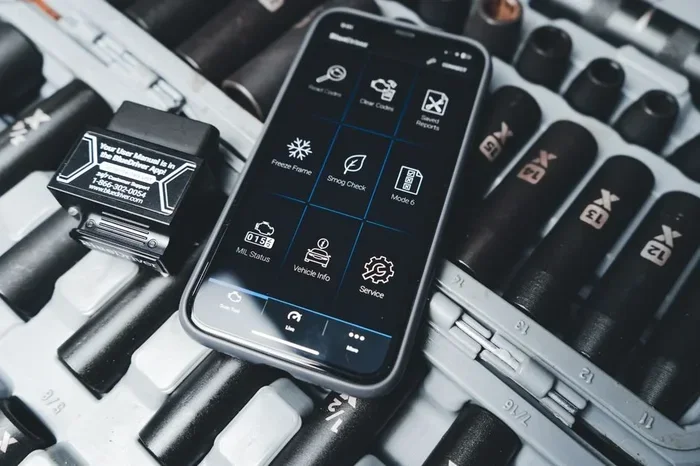
Toyota Techstream is the official diagnostic software from Toyota that lets you read fault codes, program ECUs, and perform advanced vehicle tests. Whether you are a mechanic or a car enthusiast, this tool gives you dealership-level diagnostic power on your own PC. In this guide, we break down every feature, setup step, and pro tip you need to know.
Toyota Techstream is the go-to diagnostic software that Toyota dealerships use every single day. If you have ever wondered how professionals diagnose Toyota and Lexus vehicles with such precision, the answer is this software. It connects to your car’s onboard computer, reads fault codes, and gives you deep access to every system in the vehicle. In this complete guide, we will walk you through everything you need to know about Toyota Techstream, from basic setup to advanced diagnostic procedures.
Whether you are a working mechanic, a DIY car owner, or someone who just wants to understand their vehicle better, this guide has you covered. We will explore the features, the setup process, real-world uses, and even compare Techstream to other tools on the market. By the end, you will have a clear picture of why Toyota Techstream is considered the gold standard in automotive diagnostics.
Key Takeaways
- Toyota Techstream is Toyota’s official diagnostic software for professional-grade vehicle diagnostics.
- It supports a wide range of Toyota and Lexus models with full system coverage.
- You need a compatible Toyota diagnostic adapter and a Windows PC to run the software.
- Key features include ECU programming, ABS bleed, oil reset, and system initialization.
- Techstream offers both a free viewer version and a full licensed version for advanced users.
- Common mistakes include using the wrong adapter or skipping system initialization steps.
- The software is a cost-effective alternative to expensive dealership diagnostic equipment.
📑 Table of Contents
- What Is Toyota Techstream and Why Does It Matter?
- Key Features That Make Techstream Stand Out
- How to Set Up and Install Techstream on Your PC
- Common Uses for Techstream in Toyota Diagnostics
- Techstream vs Other Diagnostic Tools: Which Is Best?
- Expert Tips and Common Mistakes to Avoid
- Final Thoughts on Toyota Techstream
What Is Toyota Techstream and Why Does It Matter?
Toyota Techstream is a diagnostic software application developed by Toyota Motor Corporation. It is designed specifically for Toyota and Lexus vehicles. The software works alongside a hardware interface, usually a Toyota-compatible diagnostic adapter, to communicate with your car’s electronic control units. Think of it as a bridge between your computer and your vehicle’s brain.
Why does this matter? Because modern cars are essentially computers on wheels. Every Toyota vehicle built after the mid-1990s relies on multiple ECUs to manage everything from engine performance to braking systems. Without the right diagnostic tool, you are essentially driving blind when something goes wrong. Toyota Techstream gives you the ability to see exactly what your car is telling you, in real time.
The software is not just for professionals. Many DIY car enthusiasts use it to save money on diagnostic fees. A single visit to a dealership for a diagnostic check can cost anywhere from $100 to $300. With Toyota Techstream, you can perform those same checks at home, as many times as you need. That alone makes it a worthwhile investment for anyone who owns a Toyota or Lexus vehicle.
How Techstream Differs from Generic OBD-II Scanners
You might be thinking, “I already have an OBD-II scanner. Why do I need Techstream?” That is a fair question. Generic OBD-II scanners read basic fault codes and clear check engine lights. They are useful, but they are limited. Toyota Techstream goes far beyond generic scanning. It can access manufacturer-specific systems that generic tools simply cannot reach.
For example, with Techstream you can:
- Perform ABS brake bleeding and initialization.
- Reset oil service intervals and tire pressure monitoring systems.
- Program new keys and ECU modules.
- View live data streams for every sensor in the vehicle.
- Run active tests on individual components like fuel pumps and solenoids.
These capabilities make Toyota Techstream a much more powerful tool than a standard OBD-II scanner. It is the difference between a basic check-up and a full physical exam for your car.
Key Features That Make Techstream Stand Out
Toyota Techstream comes packed with features that make it indispensable for anyone working on Toyota and Lexus vehicles. Let us break down the most important ones so you understand what you are getting.
Comprehensive System Coverage
One of the biggest advantages of Toyota Techstream is its coverage. The software supports engine, transmission, ABS, air conditioning, airbag, body electrical, and chassis systems. This means you can diagnose problems across virtually every electronic system in the vehicle. No other Toyota-specific tool offers this level of comprehensive coverage.
For professional technicians, this is a game-changer. Instead of juggling multiple diagnostic tools for different systems, Techstream handles everything from one interface. It streamlines the entire diagnostic workflow and saves valuable time in the shop.
Live Data Streaming and Graphing
Toyota Techstream lets you view live data from your vehicle’s sensors in real time. You can watch values like engine RPM, coolant temperature, oxygen sensor readings, and throttle position all update on your screen as you drive. The software also includes graphing capabilities, which make it easy to spot irregularities that might not be visible in a simple numerical readout.
This feature is incredibly useful for diagnosing intermittent problems. Some issues only show up under specific driving conditions. With live data streaming, you can monitor your vehicle while it is actually experiencing the problem, making diagnosis much faster and more accurate.
ECU Programming and Initialization
For advanced users, Toyota Techstream supports ECU programming and system initialization. This means you can reprogram control modules, perform idle relearns, calibrate throttle bodies, and initialize new components after repairs. These functions are typically only available at dealerships, but Techstream brings them to your workshop or garage.
For example, if you replace your battery on a modern Toyota, the vehicle may need a system initialization to reset the battery registration. Techstream can handle this quickly and accurately, something that generic scanners simply cannot do.
Free Viewer Version for Basic Users
Toyota offers a free version of Techstream called the Techstream Viewer. This version allows you to read and clear fault codes, view live data, and perform basic diagnostics. It is a great way to get started without any upfront cost. If you only need basic diagnostic capabilities, the free viewer might be all you need.
However, the full licensed version unlocks advanced features like ECU programming, system initialization, and special function tests. For serious technicians and enthusiasts, the full version is well worth the investment.
How to Set Up and Install Techstream on Your PC
Setting up Toyota Techstream is straightforward, but it does require the right equipment. Here is what you need and how to get started.
What You Will Need
Before you begin, make sure you have the following items ready:
- A Windows PC or laptop (Windows 7, 8, or 10 are the most compatible versions).
- A Toyota-compatible diagnostic adapter, such as the Toyota Techstream Adapter or a compatible VCI cable.
- A USB cable or Bluetooth connection to link the adapter to your PC.
- The Techstream software installer, which you can download from the official Toyota TIS website.
Quick Tip: Always download Techstream from the official Toyota TIS (Toyota Information Service) website to ensure you get a legitimate and up-to-date version. Using unofficial sources can expose your computer to malware and may also prevent software updates.
Installation Steps
Once you have your hardware and software ready, follow these steps to install Toyota Techstream:
- Connect your diagnostic adapter to your PC using the USB cable or Bluetooth.
- Download the Techstream installer from the Toyota TIS website.
- Run the installer and follow the on-screen prompts to complete the installation.
- Launch Techstream and select your vehicle model and year from the menu.
- Connect the adapter to your vehicle’s OBD-II diagnostic port, usually located under the steering column.
- The software should automatically detect the connection and load your vehicle’s systems.
That is really all there is to it. The first time you run Techstream, it may take a few minutes to load all the vehicle data. After that, it starts up quickly and is ready to use every time.
Common Setup Mistakes to Avoid
Many users run into issues during setup because of simple mistakes. Here are a few to watch out for:
- Using an incompatible adapter: Not all OBD-II adapters work with Techstream. You need a Toyota-compatible VCI adapter for full functionality.
- Running on an unsupported operating system: Techstream is designed for Windows. It does not work natively on Mac or Linux systems.
- Skipping software updates: Toyota regularly releases updates for Techstream. Always check for the latest version to ensure compatibility with newer vehicle models.
- Not running as administrator: On some systems, you need to run Techstream as an administrator to access all features.
Common Uses for Techstream in Toyota Diagnostics
Toyota Techstream is used for a wide variety of diagnostic tasks. Here are some of the most common use cases that both professionals and DIYers rely on.
Reading and Clearing Fault Codes
The most basic use of Toyota Techstream is reading and clearing diagnostic trouble codes, or DTCs. When your check engine light comes on, Techstream can tell you exactly what triggered it. The software provides a detailed description of each code, so you understand what the problem is before you start spending money on parts.
After you make a repair, you can clear the codes and run the vehicle again to confirm the fix worked. This simple workflow saves both time and money, especially for common issues like oxygen sensor failures, EVAP leaks, or mass airflow sensor problems.
Performing ABS Brake Bleeding
One of the standout features of Toyota Techstream is its ability to perform automatic ABS brake bleeding. This is a function that many generic scanners cannot do. If you have replaced brake components, changed brake fluid, or had air in the system, Techstream can cycle the ABS pump to purge air from the lines automatically.
This feature is especially valuable for technicians who work on Toyota vehicles frequently. Manual brake bleeding can be time-consuming and frustrating. With Techstream, the process is faster, more thorough, and much more reliable.
Oil Service Reset and Maintenance Programming
After every oil change, you need to reset the maintenance reminder on your Toyota. Toyota Techstream makes this process quick and easy. You simply connect to the vehicle, navigate to the maintenance menu, and reset the service interval. The software also supports other programming tasks like tire pressure monitoring system resets and battery registration.
For DIY car owners, this alone is a great reason to invest in Techstream. You can handle routine maintenance tasks at home without visiting a dealership or quick-lube shop.
System Initialization After Repairs
Many Toyota systems require initialization after certain repairs or component replacements. For example, replacing a battery, installing new brake pads, or swapping out a throttle body may all require a system initialization. Toyota Techstream walks you through these initialization procedures step by step, ensuring everything is calibrated correctly.
Skipping initialization can lead to warning lights, poor performance, or even drivability issues. Techstream helps you avoid these problems by making the process simple and foolproof.
Techstream vs Other Diagnostic Tools: Which Is Best?
When it comes to diagnosing Toyota and Lexus vehicles, you have several options. Let us compare Toyota Techstream to some of the most popular alternatives so you can make an informed decision.
Techstream vs. Generic OBD-II Scanners
Generic OBD-II scanners are affordable and widely available. They work with any vehicle that supports the OBD-II protocol. However, they are limited in scope. They can read and clear generic codes, but they cannot access Toyota-specific systems or perform advanced functions like ECU programming or ABS bleeding.
Toyota Techstream outperforms generic scanners in every category that matters for Toyota owners. If you drive a Toyota or Lexus and want professional-level diagnostics, Techstream is the clear winner. Generic scanners are fine for basic checks, but they fall short when you need deeper access.
Techstream vs. Other Toyota-Specific Tools
There are other Toyota-specific diagnostic tools on the market, such as the Toyota Diagnostic System (TDS) and various aftermarket alternatives. However, Toyota Techstream is the official software from Toyota itself. This means it is always up to date, fully supported, and compatible with the latest vehicle models.
Aftermarket tools may offer similar features at a lower price, but they often lack the reliability and depth of the official Techstream software. For professionals who depend on accurate diagnostics every day, the official tool is the safer choice.
| Feature | Toyota Techstream | Generic OBD-II Scanner | Aftermarket Toyota Tool |
|---|---|---|---|
| Toyota-Specific Coverage | Full | Limited | Varies |
| ECU Programming | Yes | No | Sometimes |
| ABS Brake Bleeding | Yes | No | Sometimes |
| Live Data Streaming | Yes | Basic | Yes |
| System Initialization | Yes | No | Sometimes |
| Official Toyota Support | Yes | No | No |
| Price Range | Free to Moderate | Low | Moderate to High |
As you can see from the comparison table, Toyota Techstream offers the most complete feature set for Toyota and Lexus diagnostics. It strikes the best balance between capability and cost, making it the top choice for both professionals and serious DIYers.
Expert Tips and Common Mistakes to Avoid
To get the most out of Toyota Techstream, it helps to know a few insider tips and common pitfalls. Here is what experienced users recommend.
Expert Tips for Getting the Best Results
- Always update your software: Toyota releases regular updates for Techstream. New vehicle models and updated protocols are added frequently. Keeping your software current ensures full compatibility.
- Use the right adapter: The Toyota VCI adapter is specifically designed to work with Techstream. Third-party adapters may work for basic functions, but you will miss out on advanced features.
- Save your diagnostic sessions: Techstream allows you to save diagnostic reports. This is incredibly useful for tracking recurring issues or sharing information with your mechanic.
- Learn the live data pins: Familiarize yourself with the live data monitoring feature. It is one of the most powerful tools for diagnosing hard-to-find problems.
- Back up ECU data before programming: If you are doing any ECU programming, always back up the existing data first. This protects you in case something goes wrong during the process.
Common Mistakes That Users Make
- Using an incompatible cable: Not every USB cable or OBD-II adapter works with Techstream. Using the wrong one can cause connection errors and frustration.
- Ignoring system initialization: After certain repairs, skipping the initialization step can cause persistent warning lights and poor vehicle performance.
- Running Techstream on outdated Windows versions: While Techstream works on Windows 7, 8, and 10, older versions may cause compatibility issues. Always check the system requirements before installing.
- Downloading from unofficial sources: This is a big one. Unofficial downloads can contain malware, viruses, or outdated versions of the software. Always go through the official Toyota TIS website.
By avoiding these mistakes and following the expert tips above, you will get a much smoother experience with Toyota Techstream. The software is powerful, but it works best when used correctly.
Final Thoughts on Toyota Techstream
Toyota Techstream is hands-down the most powerful and reliable diagnostic software for Toyota and Lexus vehicles. It gives you access to tools and capabilities that were once reserved exclusively for dealership technicians. From basic fault code reading to advanced ECU programming, Techstream covers it all.
Whether you are a professional mechanic looking to streamline your workflow or a car owner who wants to take control of your vehicle’s health, Toyota Techstream delivers real value. The software is affordable, especially compared to the cost of repeated dealership visits. The free viewer version alone is worth trying if you are new to automotive diagnostics.
The automotive diagnostic landscape is constantly evolving, and Toyota continues to update Techstream to keep pace with new vehicle technology. If you own a Toyota or Lexus, there has never been a better time to invest in this software. It empowers you to diagnose problems faster, perform repairs with confidence, and maintain your vehicle like a pro. Start exploring Toyota Techstream today and experience the difference that professional-grade diagnostics can make.
Frequently Asked Questions
Is Toyota Techstream free to use?
Toyota offers a free version called the Techstream Viewer, which allows basic diagnostic functions like reading and clearing fault codes. The full licensed version with advanced features like ECU programming requires a purchase or subscription through the official Toyota TIS website.
Can I use Toyota Techstream on a Mac or Linux computer?
No, Toyota Techstream is designed to run on Windows operating systems. It is compatible with Windows 7, 8, and 10. If you use a Mac, you would need to run a Windows virtual machine or use a dual-boot setup to access the software.
What diagnostic adapter do I need for Techstream?
The official Toyota VCI (Vehicle Communication Interface) adapter is recommended for full functionality. Some third-party adapters may work for basic functions, but the Toyota-branded adapter ensures compatibility with all Techstream features and receives proper support from Toyota.
Can Toyota Techstream work on vehicles other than Toyota and Lexus?
Toyota Techstream is designed specifically for Toyota and Lexus vehicles. It does not support other manufacturers. If you need to diagnose multiple brands, you may want to consider a multi-brand diagnostic tool alongside Techstream for your Toyota vehicles.
How often should I update Toyota Techstream?
You should update Techstream whenever a new version is available, especially when you are working on newer vehicle models. Toyota releases updates regularly to add support for new protocols, vehicle models, and diagnostic features. Checking for updates before each major diagnostic session is a good habit.
Do I need professional training to use Toyota Techstream?
No, you do not need formal training to use Techstream. The software is designed to be user-friendly with intuitive menus and guided procedures. However, having a basic understanding of automotive diagnostics and your vehicle’s systems will help you get the most out of the software, especially for advanced functions like ECU programming and system initialization.